
Your app is talking.Start listening
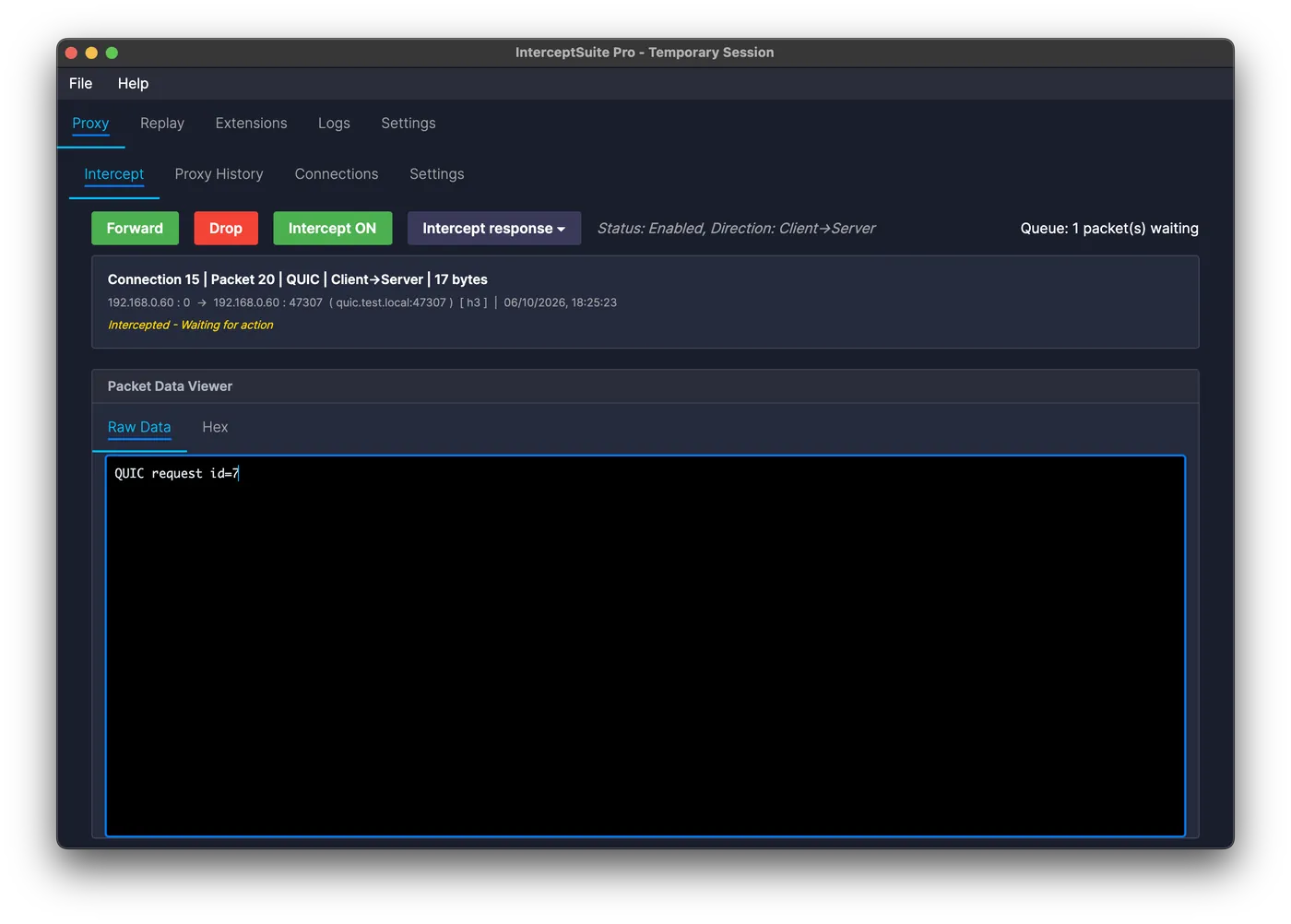
Burp, Fiddler and Charles are for HTTP. InterceptSuite handles the rest: raw TCP, TLS, DTLS, QUIC, UDP and STARTTLS. Hold a packet, change what it says mid-sentence, send it on.
Hover or tap a station to send a packet there.
Connection 5 | Packet 9 | QUIC | Client→Server | 17 bytes
192.168.0.60 : 0 → 192.168.0.60 : 47307 ( quic.test.local:47307 ) [ h3 ]
Intercepted - Waiting for action
Try it: change the text in the viewer, then press Forward. Check Proxy History, Connections and Replay afterwards. This is a simulation, nothing leaves your browser.
Windows, macOS and Linux, 7 days free, no card. New in 2.0: Replay sends your own packets to any host, or resends captured ones from history.
Built for the traffic nobody else opens
Malware analysts
Read the C2 channel in the clear
Custom binary protocols over TLS, DTLS or UDP. Decrypt the beacon, edit the command, watch the sample react, all locally inside your lab.
See the guide →Pentesters and red teamers
Test any protocol like a web app
Proxy raw sockets from a desktop, mobile or embedded app, tamper with the wire format, and find authorisation flaws HTTP tooling never sees.
See the guide →IoT and protocol researchers
MQTT, CoAP, DTLS and worse
Datagram-first devices, oddball framing, firmware with its own dialect, plus databases over TLS: PostgreSQL, MySQL, MSSQL.
See the guide →Developers and QA
Debug the protocol you wrote
Corrupt a field, cut a stream mid-handshake, replay a captured session. Reproduce the bug on demand instead of waiting for it.
See the guide →
- 6
- Protocol families
- 3
- Platforms
- 7 days
- Free trial, no card
Coverage beyond HTTP
InterceptSuite works at the transport layer, so it sees what HTTP tooling can't: IoT devices, desktop and mobile apps, databases over TLS, gaming and VoIP protocols, and anything proprietary.
- TCP
- Common stream protocols, decrypted and editable
- TLS
- Full MITM with automatic certificate generation
- DTLS
- IoT and real-time datagram traffic
- QUIC
- Raw QUIC v1 streams including HTTP/3, decrypted and editable
- UDP
- Bare datagrams, DNS, games, VoIP
- STARTTLS
- TCP protocols that upgrade mid-stream
Intercept
Hold the packet, rewrite it, send it on
Not a capture you read afterwards, a live handle on the connection. Freeze a frame mid-flight, edit the bytes in hex or text, forward it, drop it, or send it a hundred times and see what the client does. Both directions, same window.
- Real-time packet editing in both directions
- PCAP export for Wireshark forensics
- Universal TLS upgrade: STARTTLS, SMTPS, IMAP, PostgreSQL, MySQL
- CA certificate management handled for you
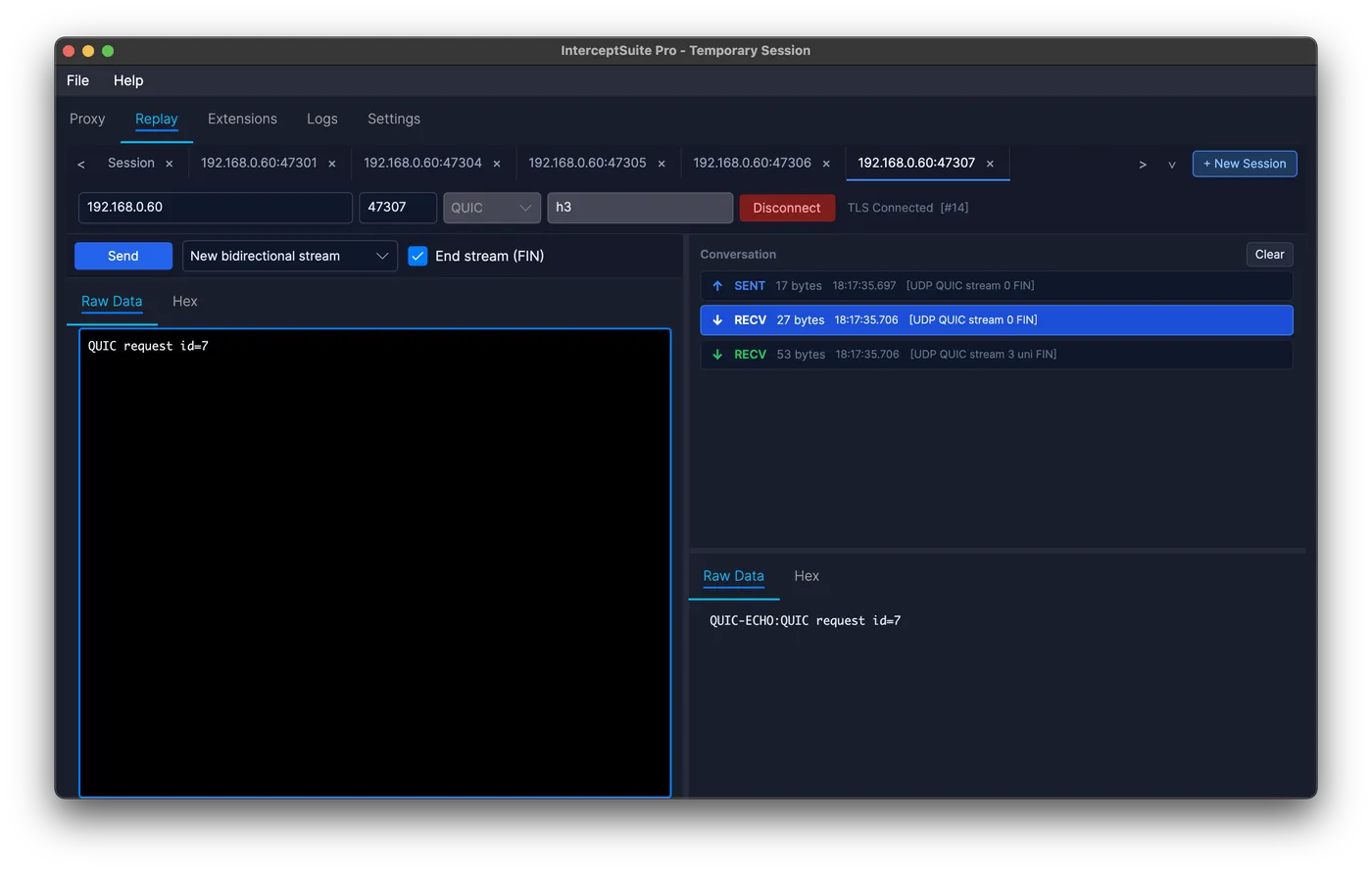
Replay, new in 2.0
Repeater for raw sockets
Enter a host, port and protocol and send whatever you like, or send a captured packet straight from Proxy History. Edit it in text or hex, resend it, and read the reply, one tab per test.
- TCP, TLS, STARTTLS, UDP, DTLS and QUIC
- Upgrade to TLS mid-session for STARTTLS testing
- QUIC stream and ALPN controls
- Sessions saved with the project
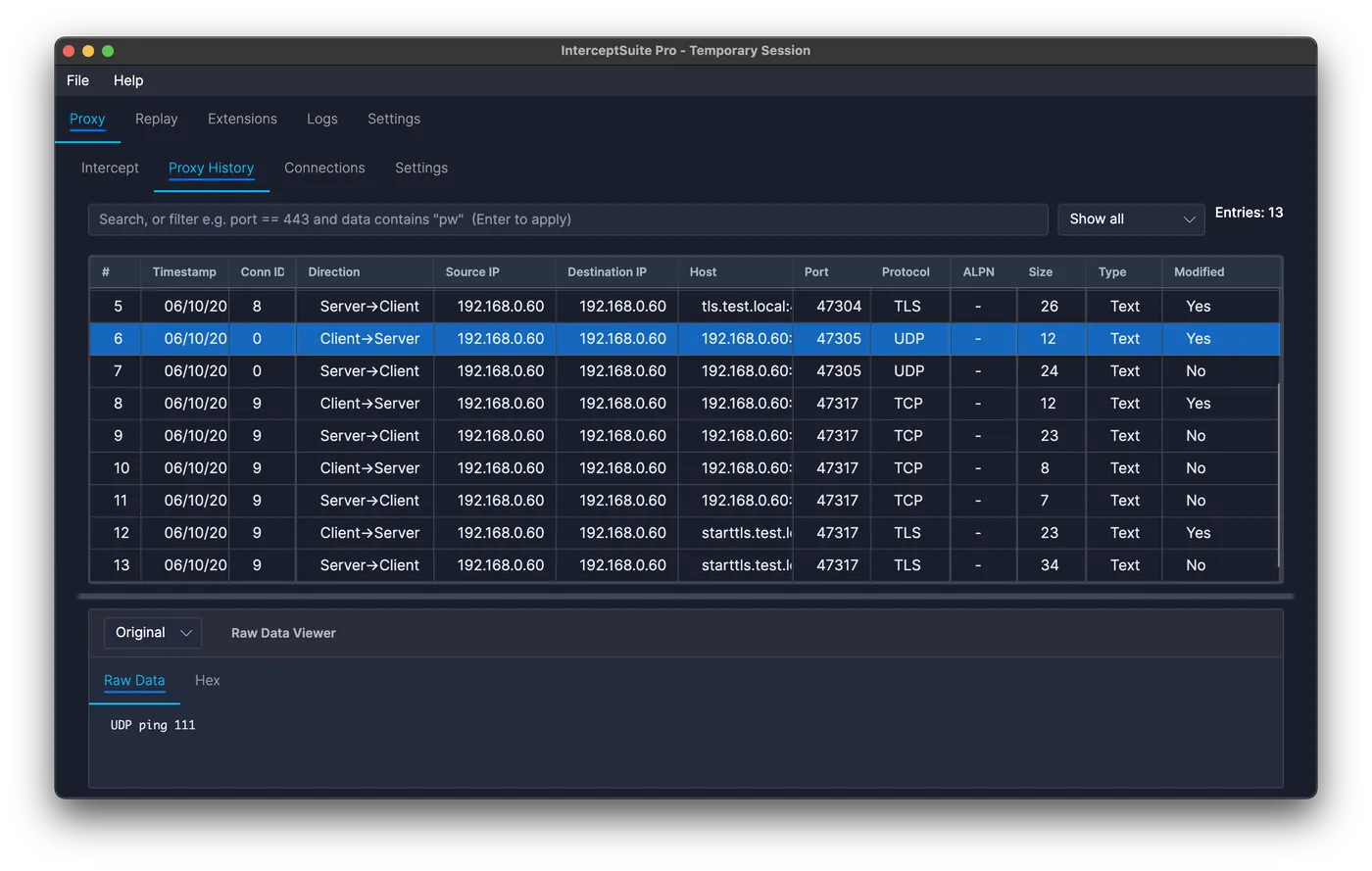
Proxy history
Nothing scrolls away
Track every connection as it happens, then export the whole capture to PCAP and open it in Wireshark for deep forensic work. TCP, TLS, DTLS and UDP, on all three platforms.

Extensions
Extend with Python
Write custom protocol dissectors, automate packet manipulation, and integrate with your security workflows using the full Python extension API, hot-reloaded while you develop.
- Custom protocol analyzers
- Simple plug-in API
- Full documentation and examples
One licence covers all of it
- TLS interception
- Full MITM for TLS, DTLS and TCP with automatic certificate generation and its own CA.
- Python extensions
- Custom protocol dissectors and packet automation, hot-reloaded while you develop.
- Session history
- Save, search and replay captured sessions across projects, with full connection detail.
- PCAP export
- Export captures directly to Wireshark-compatible PCAP files for deeper analysis.
- SOCKS5 proxy
- Built-in proxy with per-app routing rules.
- Projects
- Persistent storage keeps every engagement's captures where you left them.
Three steps to decrypted traffic
1
Route the app through the proxy
Point the target at the built-in SOCKS5 listener, or use a transparent redirector when the app has no proxy settings at all.
2
Trust the CA once
InterceptSuite generates and manages its own CA, then handles TLS and DTLS termination and re-origination automatically.
3
Watch, hold, rewrite
Every connection lands in the history, decrypted. Turn intercept on and the next matching packet waits for your edit before it goes anywhere.
Your web proxy stops where we start
Keep using HTTP-focused tools for web apps and REST APIs, that's what they're good at. Reach for InterceptSuite the moment the traffic stops being HTTP.
| Use case | InterceptSuite | HTTP intercepting proxies | Packet sniffers |
|---|---|---|---|
| Web apps and REST APIs | Limited | Best fit | Read-only |
| Desktop, mobile & custom protocols | Yes | No | Read-only |
| IoT over TCP / UDP / DTLS | Yes | No | Read-only |
| Databases over TLS | Yes | No | Keys required |
| Gaming, VoIP and real-time UDP | Yes | No | Read-only |
| Edit packets in flight | TCP/UDP + TLS/DTLS/QUIC v1 | HTTP only | No |
| STARTTLS upgrade detection | Yes | No | No |
| QUIC and raw HTTP/3 (QUIC v1) | Yes | No | Keys required |
Learn it on a real target
- PentestingBurp not intercepting your app?Why Burp goes quiet on raw TCP and TLS, and how to intercept it.
- AlternativesEcho Mirage alternative for Windows 10/11A modern, proxy-based replacement for DLL injection.
- Malware analysisDecrypt and modify C2 TLS trafficRead the beacon, edit the command, replay it in your lab.
- ReleaseInterceptSuite 2.0: Replay, rules, Scope, AI accessWhat is new in the biggest release so far.
One licence, everything included
Start with a seven-day trial: full feature access, no session time limit, no credit card. Team and enterprise terms are on the pricing page.
$200per year
- Every protocol and feature, no tiers
- Windows, macOS and Linux builds
- Email support and all updates
Common questions
Who is InterceptSuite for?
Anyone who needs to see what an application sends over the network: developers debugging client-server traffic, penetration testers and red teamers, malware analysts inspecting C2 communication, QA engineers, and IoT or database protocol researchers.
How does InterceptSuite differ from Burp Suite?
Burp Suite is designed for HTTP/HTTPS traffic only. InterceptSuite targets non-HTTP protocols - raw TCP, TLS, DTLS, STARTTLS, QUIC, and UDP - covering desktop and mobile apps, IoT devices, databases, and any custom protocol.
Is there a free trial?
Yes. InterceptSuite offers a 7-day free trial with full feature access and no session time limit. No credit card required.
What operating systems are supported?
InterceptSuite supports Windows, macOS (Apple Silicon), and Linux.
Are there protocol limitations?
Yes. InterceptSuite supports common TCP/UDP-based protocols (including raw HTTP/3 over QUIC v1), but some niche or heavily customized protocols may need additional configuration or custom Python extensions. DTLS 1.3 and QUIC v2 are not supported yet.
How do I intercept TLS traffic?
Route your target application through the built-in SOCKS5 proxy. InterceptSuite handles certificate generation and TLS termination automatically.