
Burp SuiteThick ClientTCPTLSMITMPenetration TestingNetwork Interception
When Burp Suite Isn't Enough: Intercepting Thick Client Traffic
Burp Suite is built for HTTP. When you're testing a thick client that speaks raw TCP, TLS, or a custom binary protocol, you need a different tool. Here's how to intercept non-HTTP thick client traffic with InterceptSuite.
S
Sourav Kalal
August 17, 2026·8 min read
If you do application security work, Burp Suite is probably the first thing you open in the morning. For web apps it is hard to beat. You point the browser at the proxy, trust the CA, and every request lands in the Proxy tab ready to be tampered with. That workflow has become muscle memory for most of us.
Then a thick client lands on your engagement scope, and the muscle memory stops working.
You launch the desktop app, set up Burp as an proxy, and wait. Nothing shows up. Or maybe a couple of HTTP calls appear, but the interesting part, the login, the connection check, the sync with the backend, is nowhere to be seen. The app is clearly talking to a server. Burp just can't see the conversation.
This is not a Burp problem. Burp is doing exactly what it was designed to do. The issue is that a lot of desktop software does not use HTTP at all.
Why Burp Suite Goes Quiet on Thick Clients
Burp Suite is an HTTP intercepting proxy. That is its whole model. It expects a client that knows how to talk to a proxy, and it expects the traffic underneath to be HTTP or HTTPS. When both of those hold true, it works beautifully.
Thick clients break the model in a few common ways:
- They don't use HTTP. Plenty of desktop apps talk to their backend over raw TCP, a custom binary protocol, a message queue, or a database connection. There is no HTTP for Burp to parse.
- They ignore the system proxy. Web browsers respect proxy settings. Many native applications do not even look at them. They open a socket straight to the server and go.
- They hardcode the destination. Some clients embed the server IP or use their own DNS, so redirecting them is not as simple as changing a hosts file.
None of this means the traffic is unreachable. It just means an HTTP proxy is the wrong tool for the job. You need something that works one layer lower, at the transport level, where the actual sockets live.
What "Below HTTP" Actually Means
When we say a protocol is "below HTTP" they are really talking about the transport layer. HTTP sits on top of TCP. TLS wraps TCP to add encryption. But TCP itself carries anything you want, and plenty of applications put their own protocol directly on top of it with no HTTP in sight.
Here are the kinds of traffic that fall outside Burp's reach:
- Raw TCP streams with a proprietary or undocumented format
- TLS connections to non-HTTP services, like a database or a message broker
- STARTTLS upgrades, where a connection starts as plaintext and switches to TLS partway through
- DTLS, which is TLS over UDP, common in IoT and real time systems
- Plain UDP, used by DNS, games, VoIP, and a lot of embedded devices
- QUIC, the transport behind HTTP/3 and other modern services
If your target uses any of these, an HTTP proxy will either show you nothing or show you a fraction of the picture. That is the gap InterceptSuite was built to fill.
A Different Approach: Proxy at the Transport Layer
Instead of running an HTTP proxy server, InterceptSuite runs a SOCKS5 proxy and performs the MITM at the transport layer. It terminates the TLS session coming from the client, hands you the decrypted bytes to read or edit, then opens a fresh TLS session to the real server. The client thinks it is talking to the server. The server thinks it is talking to the client. You sit in the middle with full visibility.
This is the same core idea Burp uses for HTTPS. The difference is that InterceptSuite applies it to any TCP or UDP based protocol, not just HTTP. It does not care whether the payload is JSON, a database wire format, or something nobody has ever documented. It gives you the raw decrypted stream and lets you decide what to do with it.
Because it never touches the target process, there is no DLL injection, no hooking, and nothing for endpoint security tools to flag. It runs the same way on Windows, macOS, and Linux.
Getting Traffic Into the Proxy
There is still one practical problem. If the thick client ignores proxy settings, how do you route it through InterceptSuite or Burp Suite (if HTTP/s) in the first place?
ProxyBridge is a another tool that transparently redirects TCP and UDP traffic at the operating system kernel level. It takes the connections a process makes and forces them through a proxy. It can be HTTP proxy such as ZAP/BurpSuite or Socks5 proxy such as InterceptSuite.
ProxyBridge is free and opensouce tool supprting mac, Windows and Linux
Thick Client  ->  ProxyBridge (transparent)  ->  InterceptSuite SOCKS5  ->  Real Server

Thick Client  ->  ProxyBridge (transparent)  ->  BurpSuite HTTP  ->  Real Server
This is the piece that makes the whole workflow practical. It does not matter if the app has no proxy settings, brings its own DNS, or uses a custom network stack. ProxyBridge works below all of that. On Windows it uses kernel level routing through WinDivert, on macOS it builds on the Network Extension framework, and on Linux it uses Netfilter. It is free and open source.
STARTTLS and Mixed Connections
STARTTLS deserves a special mention here because it trips up a lot of tools. Some protocols open a plaintext TCP connection and then negotiate an upgrade the TCP connection into TLS in the middle of the same connection. SMTP does it, IMAP does it, PostgreSQL, LDAP do it and many custom protocols use it in thick client.
InterceptSuite detects STARTTLS upgrade sequences automatically and performs the MITM at the exact moment the connection flips to TLS. The whole process runs in background but worth noting it down.
A Realistic Workflow
Here is roughly how a thick client assessment looks once you have the right tools in place:
- If you are dealing with HTTP/S in the thick client its better stick with BurpSuite/ZAP or similar proxy.
- If the thick client uses non HTTP or custom protocols InterceptSuite is the better option.
InterceptSuite Setup
Once we open the InterceptSuite tool, it runs a socsk5 proxy on 127.0.0.1 port 4444.
In this case we are using BetaBank as our thick client application. Since the application does not support proxy. We need to setup ProxyBridge.
ProxyBridge Setup.
In ProxyBridge menu select Proxy --> Proxy Settings. Click on the add button and enter below details.
- Proxy Type - SOCKS5
- Proxy IP Address - 127.0.0.1
- Proxy Port - 4444
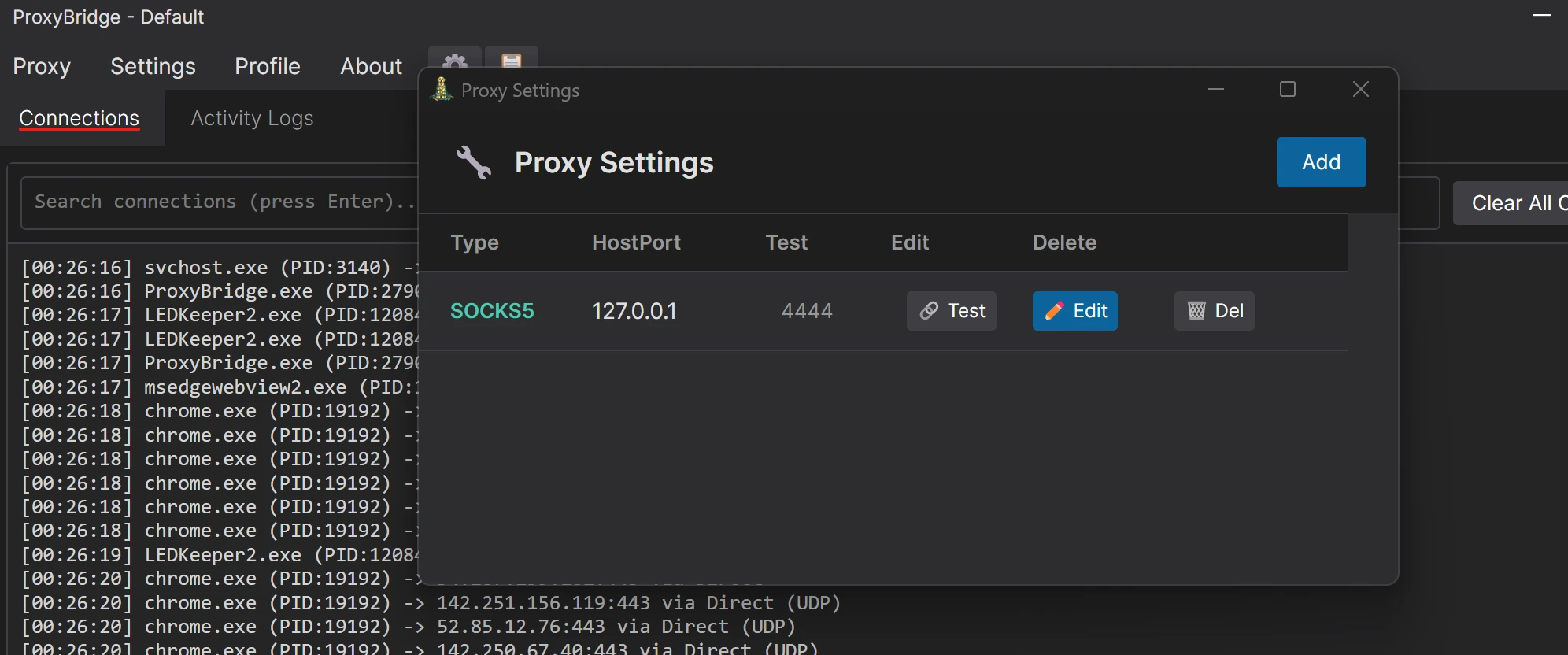
In ProxyBridge menu select Proxy --> LocalHost Via Proxy We need to enable localhost proxy as by default proxybridge ignore Localhost traffic proxy due to security reason and in our case betabank server is running locally means betabank thick client will connect to the server which is also on same machine.
In ProxyBridge menu select Proxy --> Proxy Rules. Click on the add button and enter below details.
Rule 1
- Application - BetaBank.exe
- Target Host - *
- Target Ports - *
- Protocol - TCP
- Action - Socks5 (Select above added proxy)
Rule 2
- Application - InterceptSuite.exe
- Target Host - *
- Target Ports - *
- Protocol - TCP
- Action - Direct
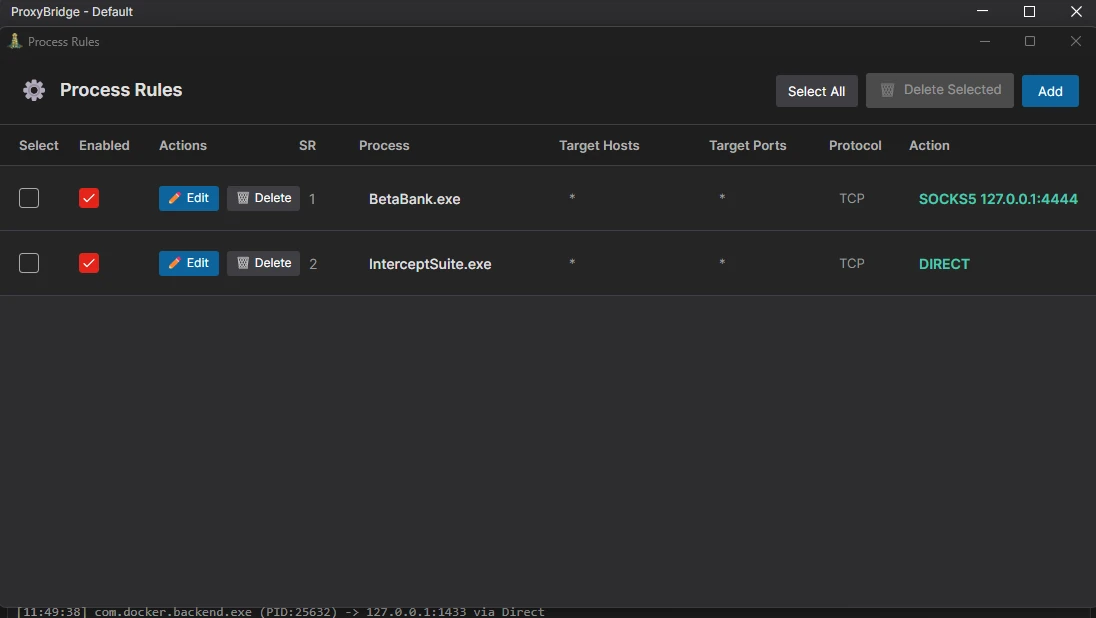
We need two proxy rule. Rule one ask ProxyBridge to redirect BetaBank traffic to Proxy. We only use TCP here as BataBank only uses TCP communication. Rule 2 is to inform ProxyBridge that InterceptSuite traffic should be direct as its our proxy so we don't want to stuck in a loop so better add a direct rule.
Intercept Traffic
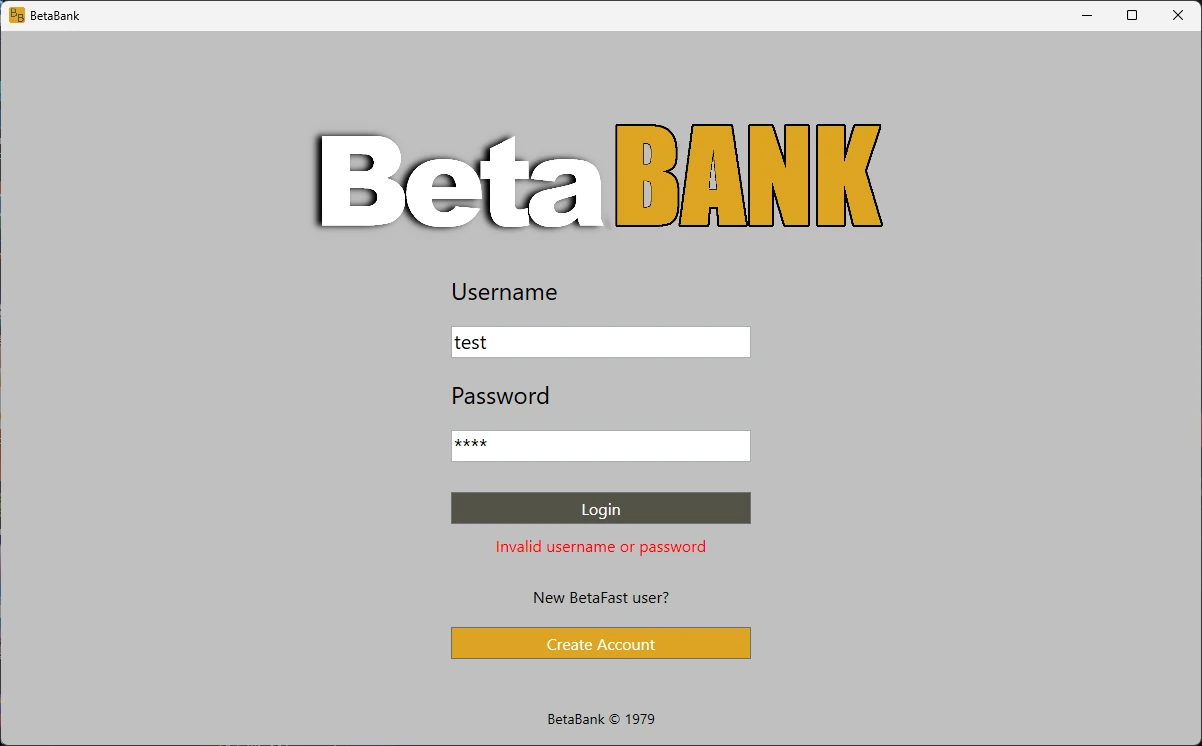
Now we are all set with the setup. We can run BetaBank application and enter any random credentials and verify if the we any error like invalid credentails to confirm application is able to connect with the server.
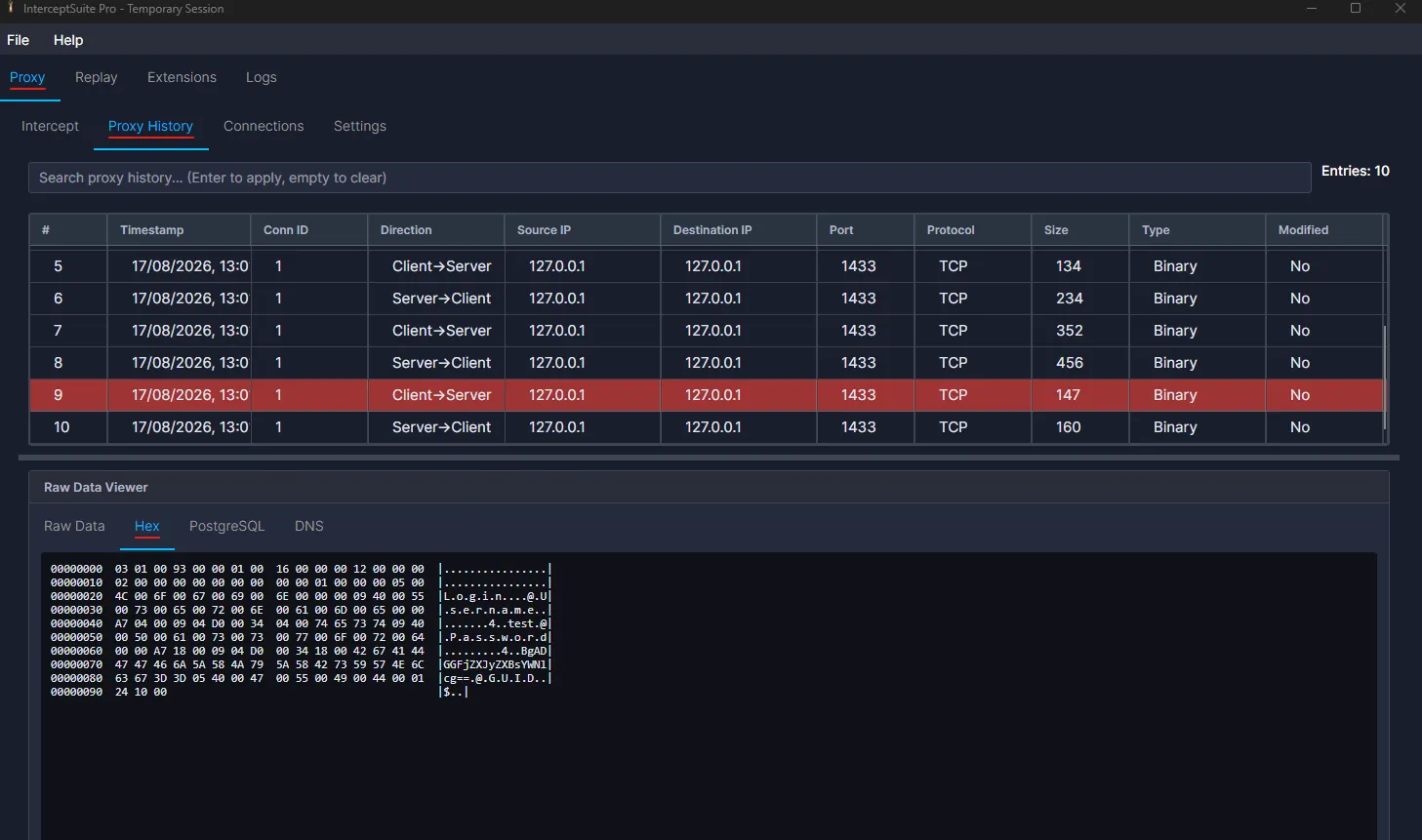
Now when we open InterceptSuite and see Proxy History we can see couple of packets from the betabank application and confirm we are able to redirect traffic via our InterceptSuite and can see the traffic there. Now similar to BurpSuite we can now intercept and modify the network traffic with InterceptSuite.s
Keep Burp. Add the Missing Piece.
None of this means Burp Suite is going anywhere. InterceptSuite is not a replacement for it, and it is not trying to be. The two tools just work at different layers.
InterceptSuite can technically intercept HTTP traffic, but it was never built for it. It does not do protocol dissection and it is not optimized for HTTP. It just sees the connection as normal raw TCP or TLS traffic, the same way it treats everything else. So for HTTP and HTTPS, Burp Suite still wins. That is what it was designed for, and nothing here changes that.
Where InterceptSuite steps in is everything that is not HTTP. Databases, custom protocols, UDP, QUIC, DTLS, and anything else riding on raw TCP or UDP. This is exactly the kind of traffic Burp cannot touch, because Burp was not designed for network level interception. In the same way, InterceptSuite was not designed for web traffic. Use Burp for HTTP, use InterceptSuite for everything below it, and you have got both sides covered.
→ See how InterceptSuite works or start a free trial, no credit card required