
Java RMIThick ClientTLSJavaSerializationNetwork InterceptionExtensions
How to Intercept Java RMI Traffic over TCP and TLS
How Java RMI works, how to get its traffic into a proxy, and how to read and edit the calls over plain TCP and over TLS using the InterceptSuite CA.
S
Sourav Kalal
November 22, 2026·12 min read
I wanted to see how to intercept Java RMI traffic and whether we can edit it like a normal request. Java RMI, short for Java Remote Method Invocation, is an old Java technology, but a lot of Java desktop applications still use it to talk to their server. It is not HTTP, so Burp Suite and the other HTTP proxies show nothing at all, and it can run over plain TCP or over TLS.
To test it I built a small Java application, a fake banking client called Acme Ledger with a server behind it. I wrote it together with Claude, an AI assistant. You log in, look at two accounts and send a transfer. All the screenshots in this post are from that application, and I did the same steps twice, once with plain TCP and once with TLS.
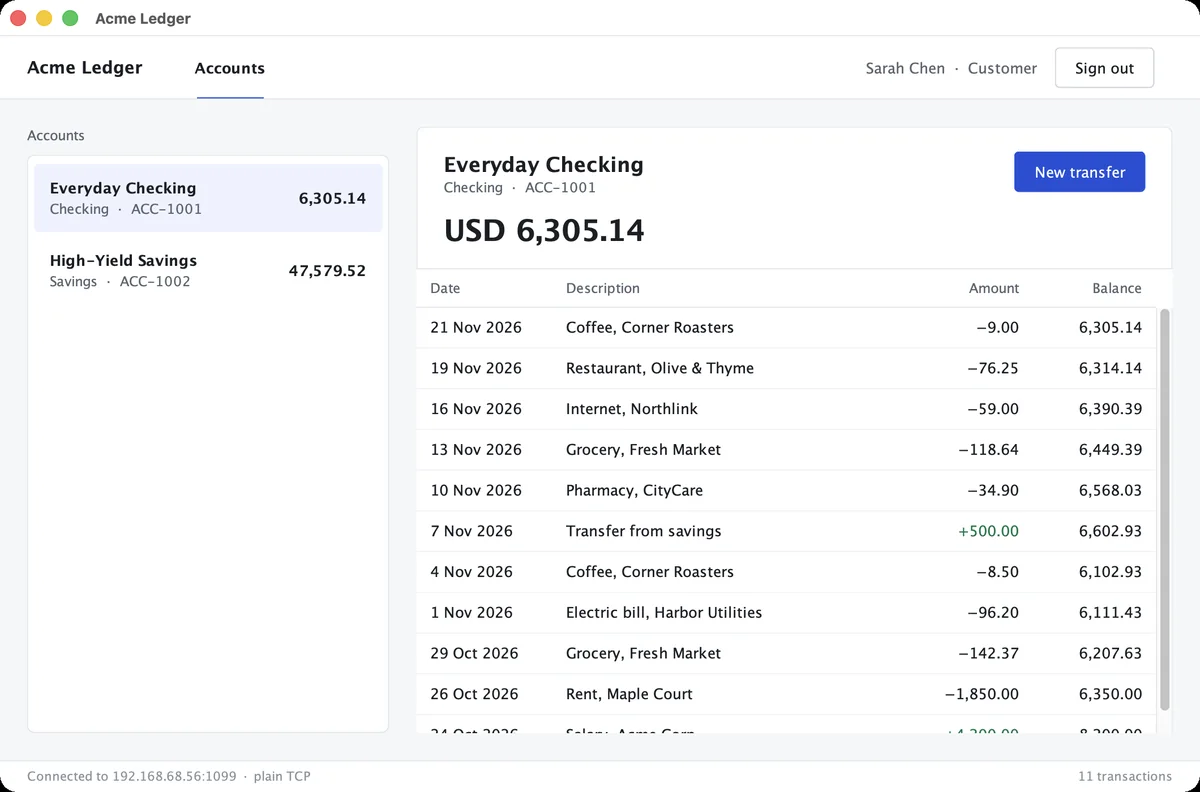
Table Of Content
- What is RMI
- How a Call Looks Over the Network
- Proxy Setup
- Java RMI TCP Traffic
- Decoding With the Extension
- Editing the Request
- Java RMI Over TLS
- Install the CA Certificate
- Limitations
- Tools
What is RMI
RMI stands for Remote Method Invocation. With RMI we can call a method of an object that is running in another program, in most cases on another machine, and the code looks the same as a local call. It is part of Java since the 1990s and it does not need any extra library, so if both sides are Java it is the quickest way to connect a desktop client with a server. JMX, which jconsole uses to connect to a running Java program, uses RMI by default as well.
This is one of the interfaces from my lab server.
public interface AuthService extends Remote {
    Session login(String username, String password)
        throws RemoteException, LedgerException;
}
The client does not have the real object, it has a stub. When the client calls login on the stub, the stub converts the arguments into bytes, sends them to the server and waits for the answer. The server has a matching part that calls the real method and sends the result back.
The arguments and the result are Java objects, and RMI converts them into bytes with Java serialization. It is the same thing you get when you write an object to a file with ObjectOutputStream. That is the reason the traffic is not text, but it is also the reason we can still read and edit it later.
How a Call Looks Over the Network
Before the client can call anything it has to find the object. For that the server runs a small registry, a kind of phone book, which listens on port 1099 by default. The client asks for a name like AuthService and the registry returns a stub.
So basically the stub is not only a name. It also has the address of the real object, which is a host, a port and an object ID, and every later call goes to that address. The registry is on 1099 but the objects can listen on another port, and if the developer does not choose one Java picks a random port. In my lab I fixed everything to 1099 so there is only one port to watch.
The Java RMI protocol is called JRMP, the Java Remote Method Protocol. A new connection starts with seven bytes from the client.
4a 52 4d 49  00 02  4b
J  R  M  I   v2     stream
The server answers with 4e and the host and port it sees for the client, and then the client sends its own host and port. After that the calls start. A call is a 50 byte followed by a Java serialization stream. This is the call my client sends to the registry to look up AuthService.
50                         call
ac ed 00 05                start of the serialization stream
77 22                      a block of 34 bytes follows
00 00 00 00 00 00 00 00 00 00 00 00 00 00 00 00 00 00 00 00 00 00
                           object ID, all zero, this is the registry
00 00 00 02                operation 2, which is lookup
44 15 4d c9 d4 e6 3b df    hash that names the Registry interface
74 00 0b                   a string, 11 bytes long
41 75 74 68 53 65 72 76 69 63 65
                           AuthService
There are only a few messages in the protocol.
| First byte | Sent by | Meaning |
|---|---|---|
50 |
client | call |
51 |
server | return |
52, 53 |
client, server | ping and ping reply |
54 |
client | acknowledges a returned stub |
You will also see calls to object number 2. It is the distributed garbage collector, where the client tells the server every few minutes that it still holds a reference. In my lab it was about every five minutes, so you can ignore it.
Inside the call there is the serialization stream, which starts with ac ed 00 05. After that come the class descriptions and the values. A string is 74 followed by a two byte length and the text, and an object is 73 followed by its class and its fields. If the same string is used twice, the second time it is only a pointer to the first one. Lengths are everywhere in this format, and that is why editing it by hand in hex is hard. If we change a name from 5 characters to 8, three different lengths are wrong.
Proxy Setup
For this I am using InterceptSuite, a tool I created to intercept and analyse the network traffic of desktop applications, whether it is encrypted or not. It works as a SOCKS5 proxy on 127.0.0.1:4444 and shows the raw bytes of every packet.
As I said RMI is not HTTP, so an HTTP proxy has nothing to work with. A Java application also does not read the proxy settings of the operating system, and the usual http.proxyHost flags work only for HTTP. On top of that, the stub has its own address, so even if we catch the first connection to the registry, the next calls can go directly to the server.
For a Java RMI proxy to work we need a way to catch every connection of the Java application. I tested two options, and we need only one of them, not both.
Option 1: Redirect Tab
Open Proxy, then Redirect, click Add, type java as the application and keep the action as Proxy. Then click Start Redirect. On macOS the system asks once to approve a network extension, the details are on the Traffic Redirect page. Windows works the same way, and on Linux we can use ProxyBridge.
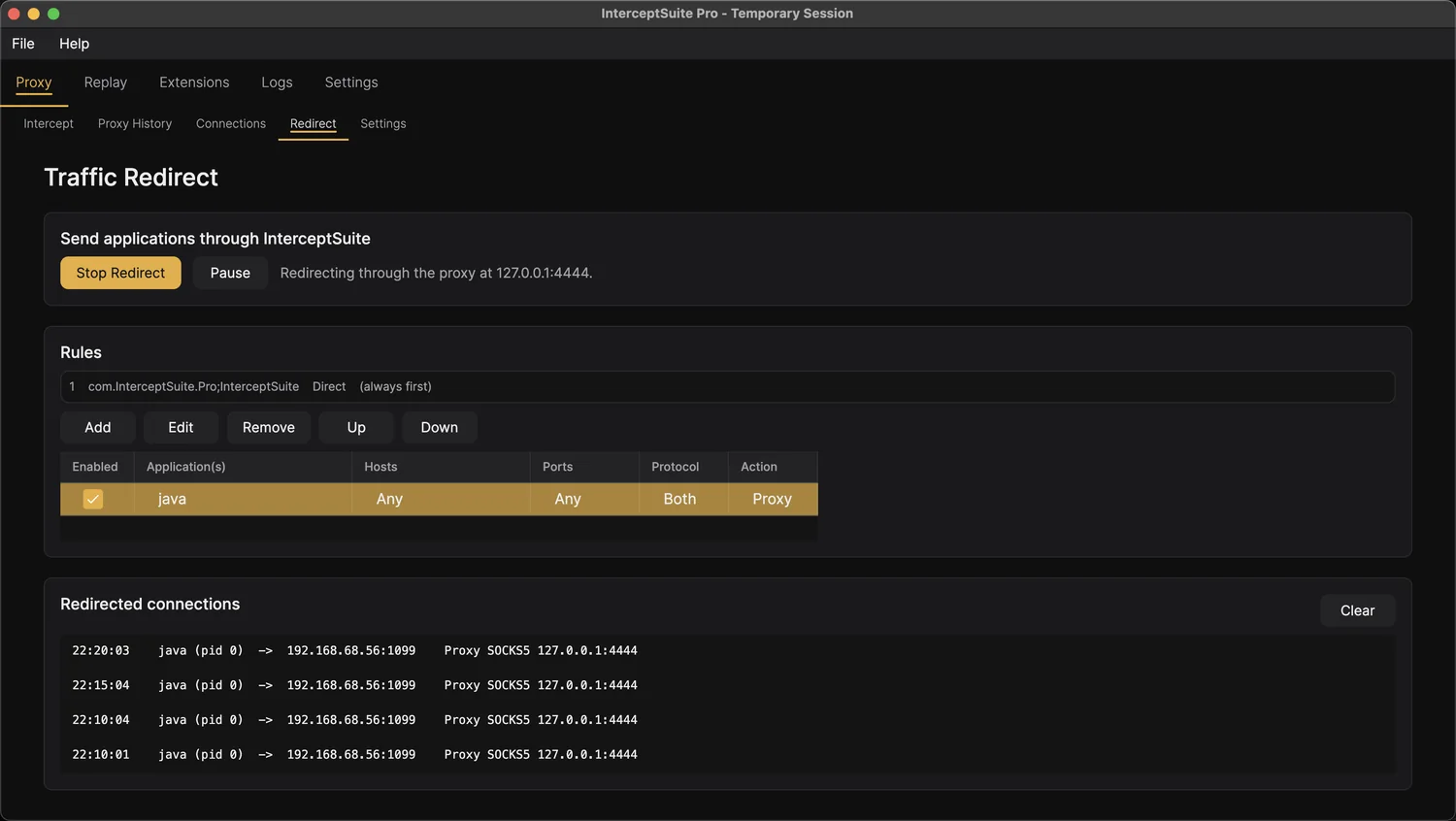
This rule catches every Java program on the machine, including the IDE. If that is too much we can add the host and port of the server to the rule.
Option 2: SOCKS Proxy Properties
This option is for the case when we can not use Redirect, or when we want only one launch of the application to go through the proxy. InterceptSuite is a SOCKS5 proxy on 127.0.0.1:4444, and Java can send all its sockets through a SOCKS proxy with two system properties.
java -DsocksProxyHost=127.0.0.1 -DsocksProxyPort=4444 -jar app.jar
I would not turn on the Redirect rule for java at the same time, because then we do not know which of the two is doing the work. I tried this with the lab client with the redirect turned off, and the client opened its connections to port 4444 and the login worked. It is the easiest method if we can change how the application starts. If the application sets its own proxy handling it may ignore these properties, but I did not test that case.
Java RMI TCP Traffic
Let's start the client and log in. In the Proxy History the first packet of the connection is only seven bytes.
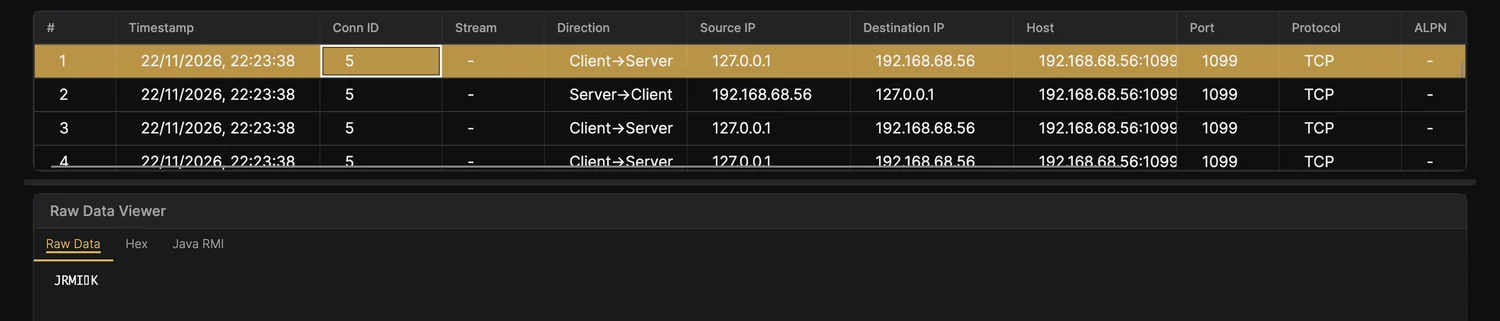
The raw viewer shows JRMI and a K, which are the seven bytes from the start of this post. The client and the server are agreeing to use RMI.
Next is the login call. The raw view is mostly garbage characters, but the email and the password are right there in the middle, nothing is encrypted.
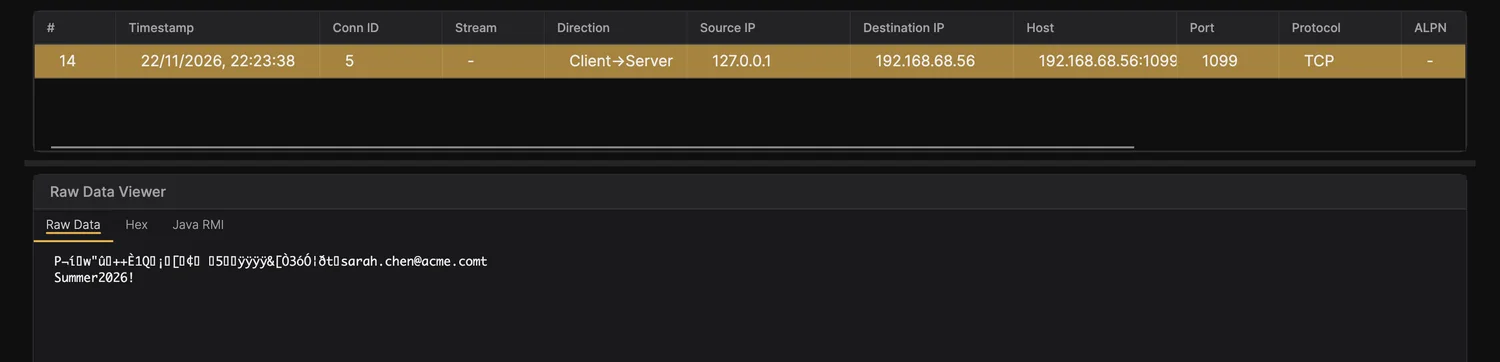
The hex view is a little easier to follow, and it starts with 50 ac ed 00 05, the call byte and the start of the serialization stream, same as the bytes above.
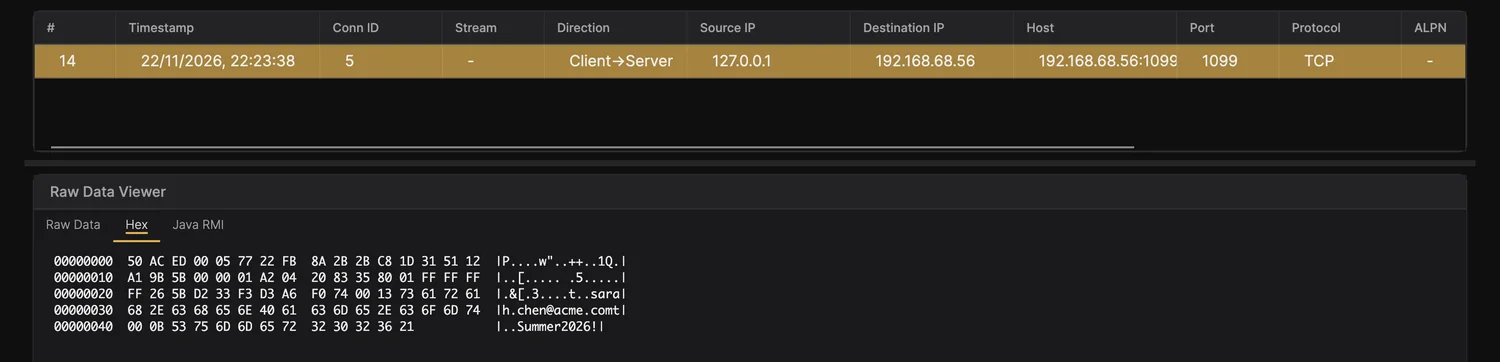
We can already do a lot of Java RMI traffic inspection with these two views, like searching in the history and seeing which packet carries what. The problem is that we can not edit a string here without breaking the lengths, and reading class descriptions in hex is not something I want to do.
Decoding With the Extension
InterceptSuite shows the raw bytes and it does not know RMI. This is the same as for PostgreSQL or HTTP/3, where an extension adds the readable view, so I made one for RMI. Most of the code was written by Claude. It is open source and available here: java-rmi on GitHub.
We can load it like any other extension, the steps are in the extension overview. It needs Python 3.8 to 3.12 on the machine and it uses only the standard library. Once it is loaded there is a new tab called Java RMI next to Raw Data and Hex.
This is the same login call in that tab.
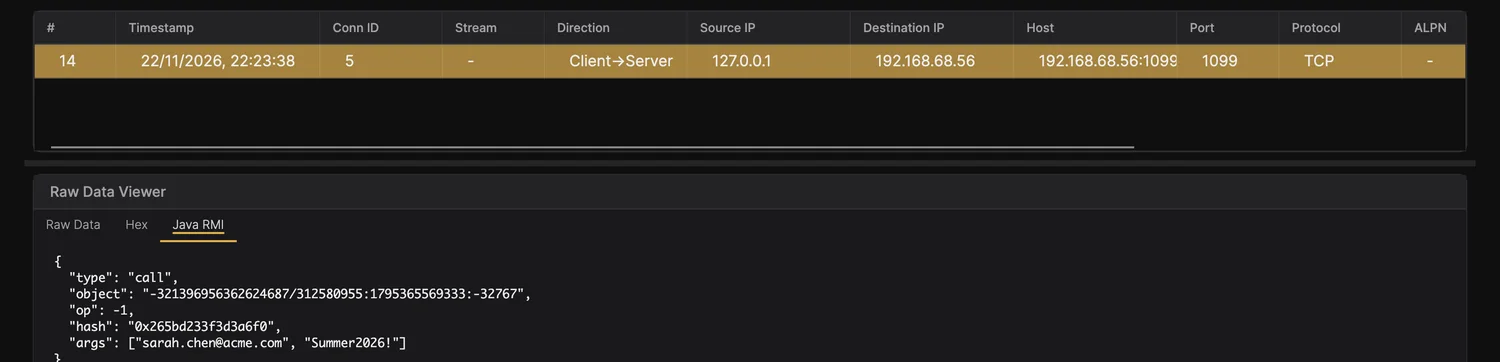
We can see the object ID, the operation number and a hash of the method, which together decide which method runs on the server. After that are the arguments, which are the two strings the user typed.
For bigger objects the extension shows the class and its fields. If the parent class has fields they are under super, and a value that is used twice gets an id and the second use is a ref that points to it. At the bottom there is a classes list that describes each class once, with the name, the version number and the fields. Java needs that to read the bytes back, so the extension keeps it.
This is the stub that comes back from the registry.
{
  "remote": "UnicastRef2",
  "host": "192.168.68.56",
  "port": 1099,
  "object": "9076888321381563002/-748999300:1795363536239:-32767",
  "resultStream": true
}
This is where the stub says which host and port the next calls go to. Normally it is hidden inside a block of bytes, and I wanted it to be easy to see and easy to change.
Editing the Request
Now let's try to change something. I want to send a transfer of 100.00 from checking to savings and change the amount on the way.
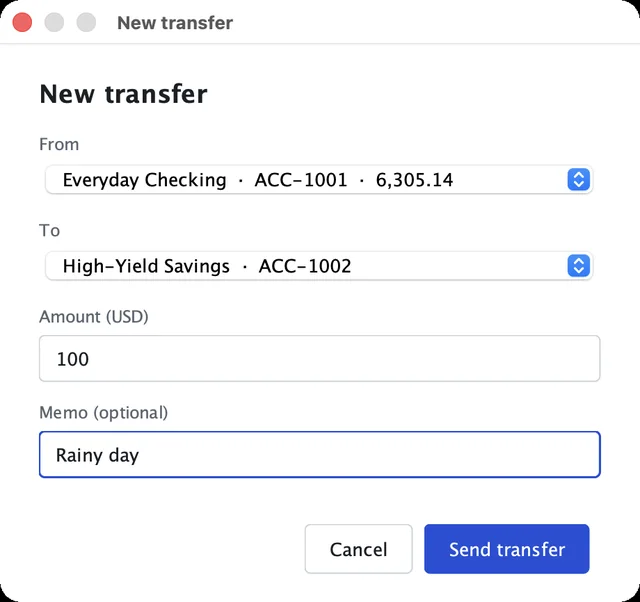
I turned Intercept on in InterceptSuite first. The client opens a new connection for the transfer, so the first packets that were held were the handshake. I forwarded those and then the call itself was held.
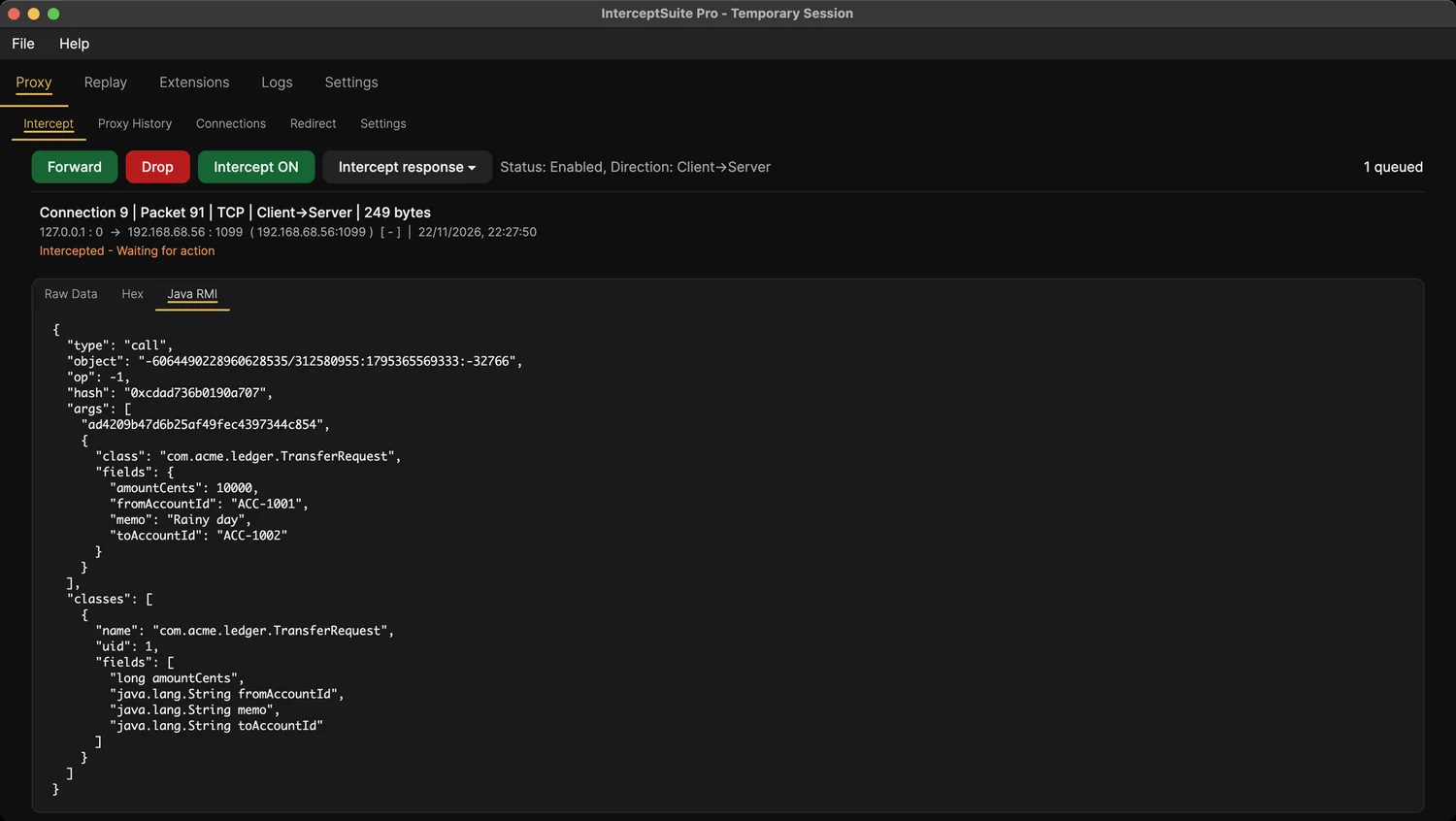
Here is the whole request. It is a TransferRequest object with four fields, and amountCents is 10000, which is 100.00. I double clicked on the number and typed 500000.
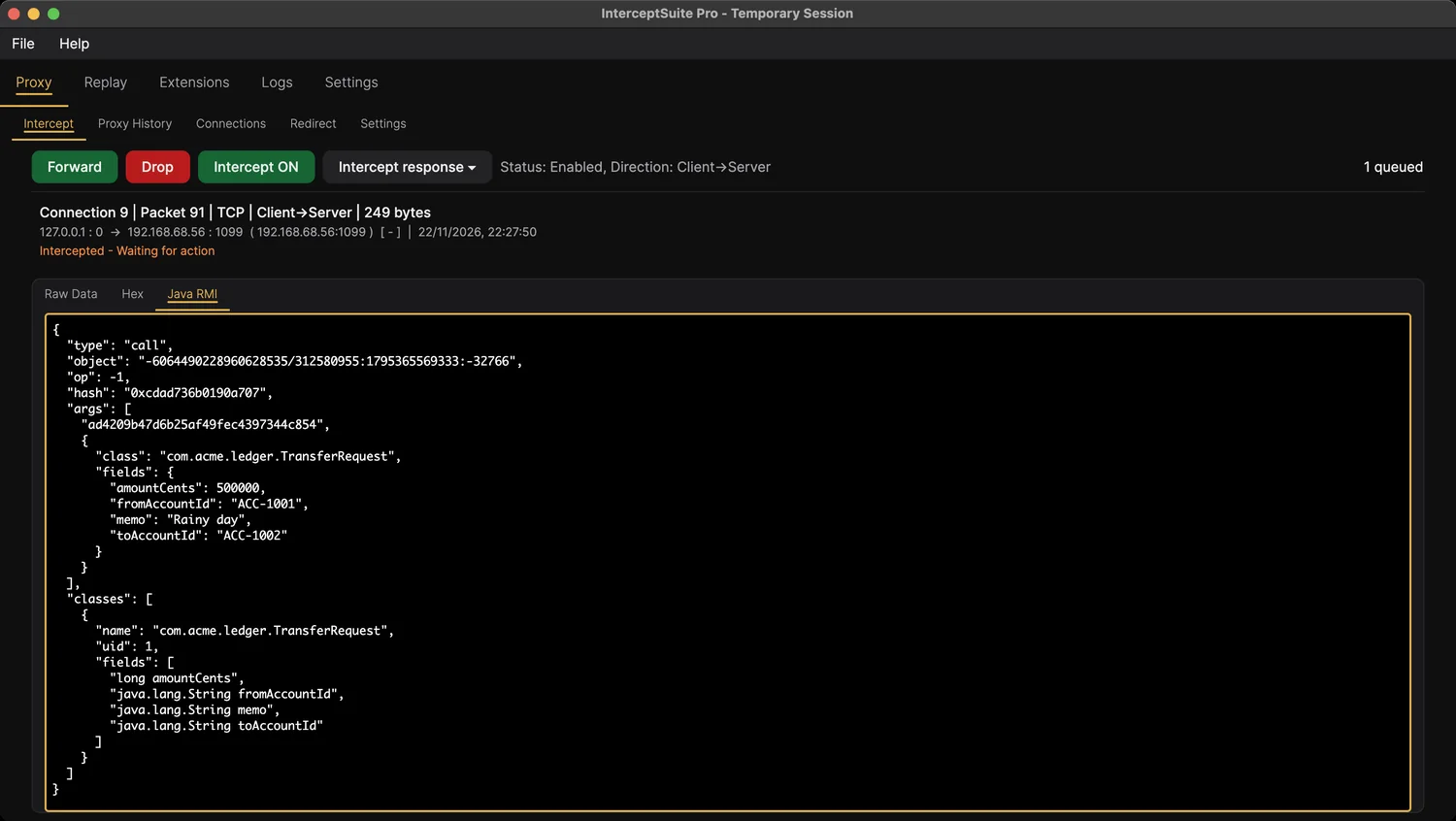
After clicking Forward the client showed this.
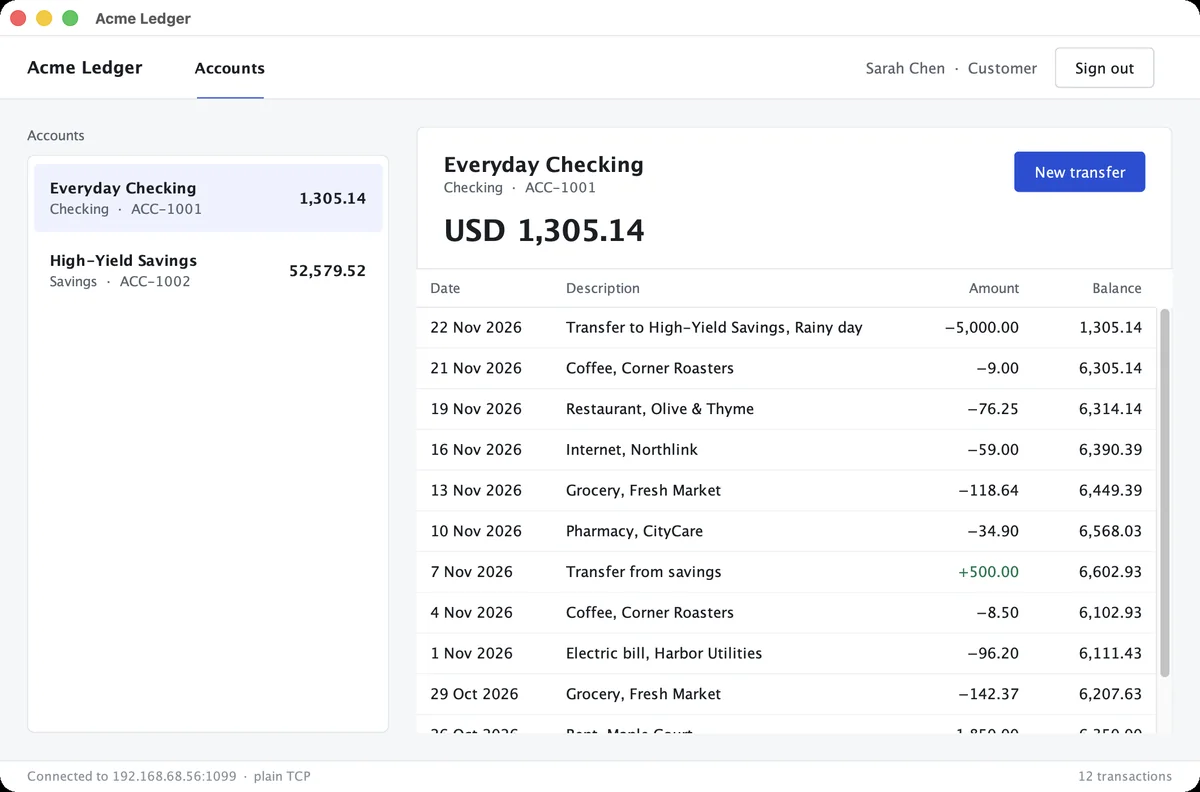
I typed 100.00 in the application and the server moved 5,000.00. There is nothing in the call that says the number came from a text box, the server only sees a number. The server did not accept everything though. It allows a maximum of 10,000.00 for each transfer and it checks the balance and who owns the account, so I could go up to the limit and not more. That is how I would test a real application too, change the value and see which check catches it.
When we edit the text the extension creates the bytes again. It calculates the string lengths, the array sizes and the block sizes again and renumbers the pointers, and if the edit does not make sense, like a word where a number should be, it drops the edit and the original packet goes through.
My first try did not work. The client showed "The server did not answer in time" because I held the packet for more than eight seconds and the client has a timeout. If your application does the same, start it with a longer timeout while testing.
java -Dsun.rmi.transport.tcp.handshakeTimeout=600000 \
     -Dsun.rmi.transport.connectionTimeout=600000 \
     -Dsun.rmi.transport.tcp.responseTimeout=600000 \
     -jar app.jar
Java RMI Over TLS
RMI can run over TLS too. It is also called RMI over SSL, because the classes are named SslRMIServerSocketFactory and SslRMIClientSocketFactory. The server exports its objects with SslRMIServerSocketFactory and the stubs it gives out carry the matching SslRMIClientSocketFactory, and that is how the client knows to use TLS for the next calls. This is the same stub as before, but now it has a socket factory.
{
  "remote": "UnicastRef2",
  "host": "192.168.68.56",
  "port": 1099,
  "factory": {"class": "javax.rmi.ssl.SslRMIClientSocketFactory"},
  "object": "1978420286093462107/-1196511537:1795364945437:-32766",
  "resultStream": false
}
From here the client talks TLS to that address. InterceptSuite can sit in the middle of the TLS connection, but only if the client trusts it. A TLS client trusts only the certificates signed by a CA it knows, and the InterceptSuite CA is new for it, so the client closes the connection. This is what my client showed when I tried without the CA.
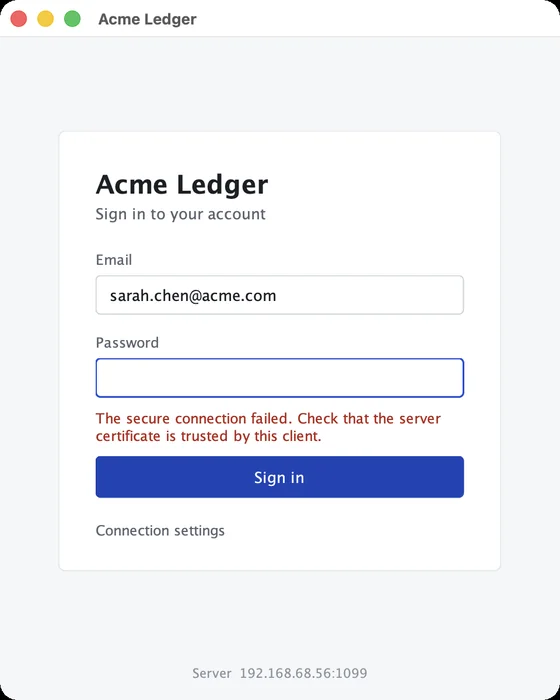
So where does Java get the trusted CAs? Not from the system. Java has its own list in a file called cacerts inside the JDK, and an application can also bring its own truststore and tell Java about it with -Djavax.net.ssl.trustStore. Installing the InterceptSuite CA in the macOS Keychain or in the Windows certificate store does not help a normal Java client, and I think this is the part where most people lose time.
Install the CA Certificate
First we need the CA from InterceptSuite. Open Proxy, then Settings, and under Certificate Management click Export Certificate.
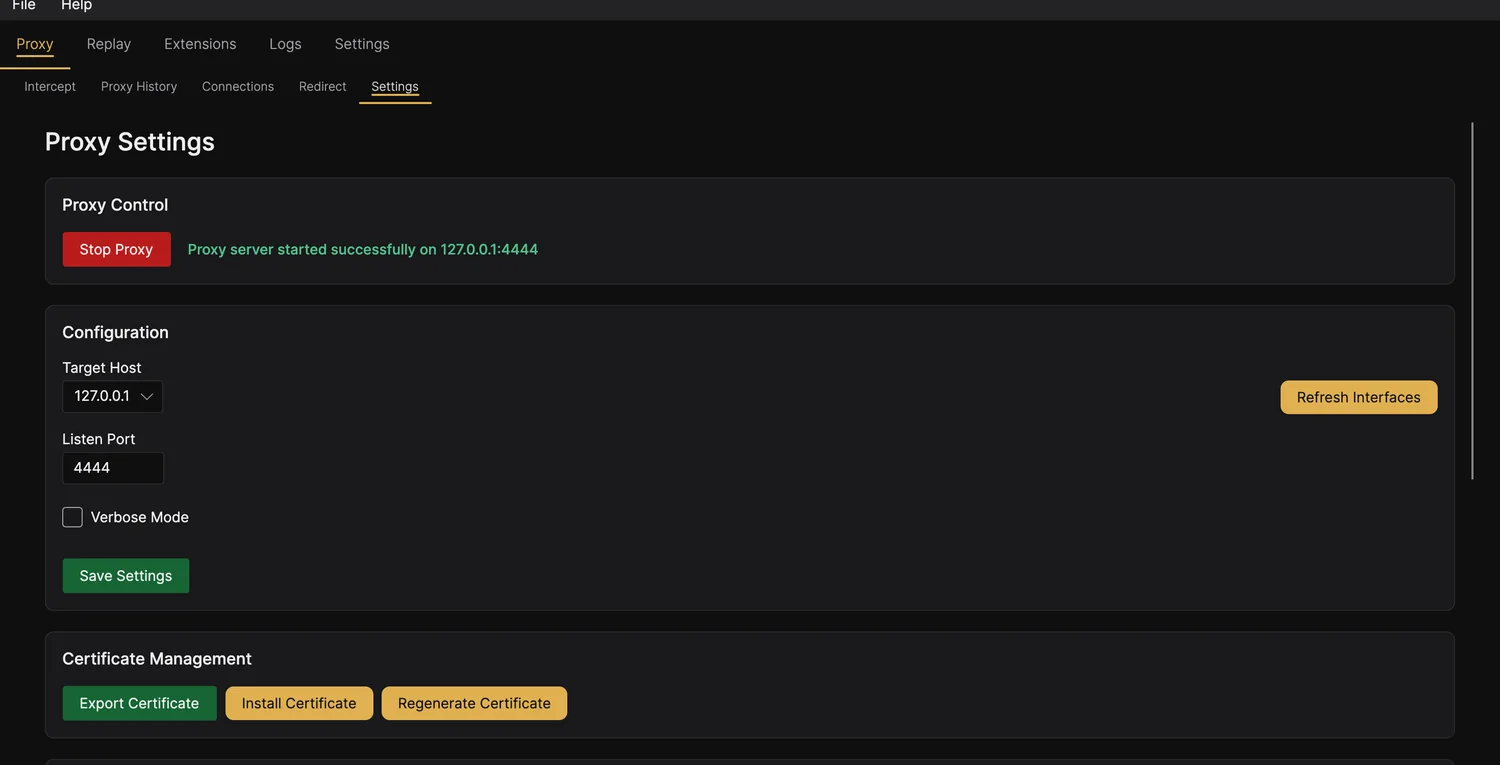
Select the certificate in DER format. We do not need the private key.
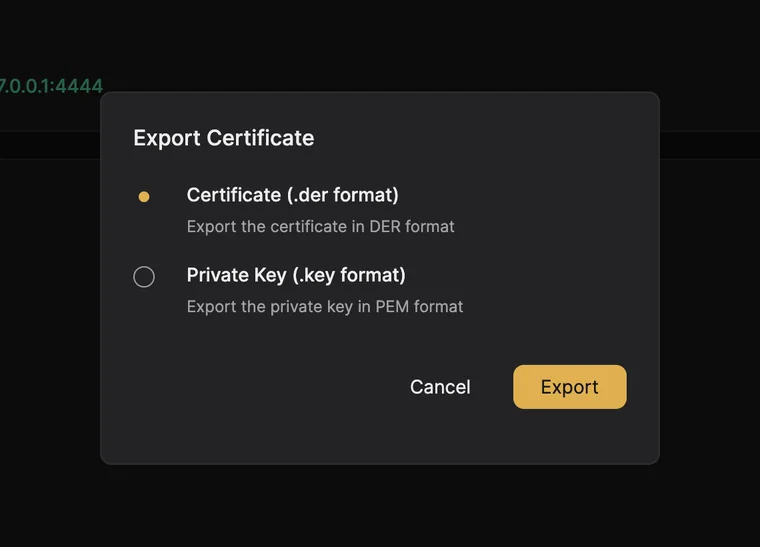
Now we put it in a truststore. I created a new file only for testing so nothing else on the machine changes.
keytool -importcert -alias interceptsuite \
        -file Intercept_Suite_Cert.der \
        -keystore interceptsuite-truststore.p12 \
        -storetype PKCS12 -storepass changeit -noprompt
Then we start the client with that file.
java -Djavax.net.ssl.trustStore=interceptsuite-truststore.p12 \
     -Djavax.net.ssl.trustStorePassword=changeit \
     -jar app.jar
Most real thick clients load their own truststore. Look in the start script or in the install folder for trustStore, or for a .jks or .p12 file next to the jar, and if there is one the CA has to be imported into that file. We can also import the CA into the cacerts file of the JDK, which is in lib/security/cacerts and the default password is changeit. It works, but it changes every Java program that uses that JDK, so for testing I prefer a separate file.
With the CA in place the login worked and we can see it in the history.
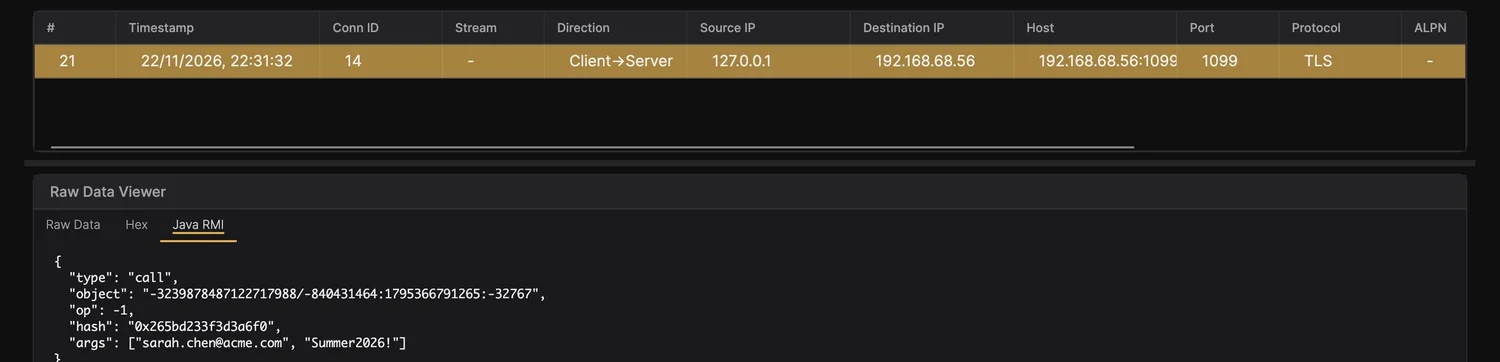
The Protocol column now says TLS and the Java RMI tab shows the same call as before, with the same email and password, so Java RMI TLS traffic is as easy to read as the plain TCP one. From here everything is the same as in the plain TCP part, we can hold a call, edit it and forward it.
Limitations
There are a few things I need to say clearly.
Objects that use Externalizable can not be read. RMI writes them without a length and without an end marker, so only the class itself knows where they stop. The extension hides its tab for those messages, and the Raw and Hex tabs still work.
A server can also refuse classes it does not expect. My lab server accepts only its own classes and the basic Java types, so changing values works well but putting a different class in the call may be refused.
I did not try two TLS cases. If the server asks the client for its own certificate, or if the application checks for one exact server certificate, adding a CA is not enough.
Tools
That is how we can intercept Java RMI traffic with InterceptSuite, over plain TCP and over TLS. All the tools can be found below.