
PostgreSQLDatabaseTLSSSLRequestThick ClientNetwork Interception
Intercepting PostgreSQL Traffic with InterceptSuite
Learn how to intercept PostgreSQL traffic including SSL/TLS upgrades using InterceptSuite and ProxyBridge. See plaintext queries, credentials, and responses.
I
InterceptSuite Team
June 30, 2026·7 min read
PostgreSQL is one of the most common databases in enterprise applications. When performing thick client penetration tests or reviewing application security, being able to intercept the raw PostgreSQL wire protocol gives you visibility into every query, credential, and response, including connections that upgrade from plaintext to TLS.
Standard HTTP proxies (Burp Suite, OWASP ZAP) cannot intercept PostgreSQL traffic. InterceptSuite is built specifically for non-HTTP protocols like PostgreSQL.
How PostgreSQL TLS Works
Unlike STARTTLS (used by SMTP, IMAP, and LDAP), PostgreSQL has its own native SSL negotiation mechanism. It also supports multiple TLS modes controlled by the sslmode client parameter:
| sslmode | Behaviour |
|---|---|
disable |
No TLS, plaintext only |
allow |
Prefer plaintext, upgrade if server requests |
prefer |
Try TLS first, fall back to plaintext |
require |
TLS required, no certificate verification |
verify-ca |
TLS required, CA certificate verified |
verify-full |
TLS required, CA + hostname verified |
When TLS negotiation is enabled, PostgreSQL uses a two-phase connection startup:
- The client sends an 8-byte
SSLRequestmessage (00 00 00 08 04 D2 16 2F) - If the server supports TLS, it responds with
Sand the TLS handshake begins - If not, it responds with
Nand the connection continues as plaintext (or the client disconnects ifsslmode=require)
InterceptSuite automatically detects this SSLRequest pattern and performs a MITM at the right moment, terminating the TLS session from the client, decrypting the payload, and re-establishing TLS to the upstream server. You see plaintext PostgreSQL wire protocol throughout, regardless of which sslmode the client is using.
What You Can See
Once intercepted, every PostgreSQL session reveals:
- Startup messages: username, database name, and client parameters
- Authentication exchanges: MD5 challenge/response or SCRAM-SHA-256 credentials (see limitations below)
- Simple queries:
SELECT,INSERT,UPDATE,DELETEin plaintext - Extended query protocol: prepared statement names, bind parameters, and result rows
- Server responses: row data, error messages, and notice responses
Setup: Intercepting PostgreSQL with InterceptSuite
Prerequisites
- InterceptSuite installed and running (SOCKS5 proxy on
127.0.0.1:4444by default) - ProxyBridge installed for transparent routing
Step 1 - Start InterceptSuite
Open InterceptSuite and confirm the SOCKS5 proxy listener is active in the Proxy tab. The default listener runs on 127.0.0.1:4444.
Step 2 - Configure ProxyBridge
Open ProxyBridge and set the proxy target to the InterceptSuite listener:
- Click Proxy → Proxy Settings
- Set Proxy Type to
SOCKS5 - Set Proxy Host to
127.0.0.1, Port to4444 - Click Save Changes
Step 3 - Add Proxy Rules
You need two rules to avoid routing loops:
Rule 1: InterceptSuite goes direct
| Field | Value |
|---|---|
| Applications | InterceptSuite.exe |
| Target Ports | * |
| Action | DIRECT |
Rule 2: PostgreSQL ports go through proxy
| Field | Value |
|---|---|
| Applications | * |
| Target Ports | 5432 |
| Action | PROXY |
Rule order matters. The DIRECT rule must be above the PROXY rule.
Step 4 - Install the CA Certificate
For TLS connections, install the InterceptSuite CA certificate as a trusted root on your test machine. Without this, the PostgreSQL client will reject the MITM certificate.
Most PostgreSQL clients (psql, JDBC, libpq) use the system trust store by default. After installing the CA, connections will succeed without certificate errors.
Step 5 - Run the PostgreSQL Client
Connect your client to the actual PostgreSQL server IP and port 5432 as normal. ProxyBridge transparently intercepts the connection before it leaves your machine.
psql -h 192.168.0.60 -U appuser -d production_db
Step 6 - Inspect Traffic in Proxy History
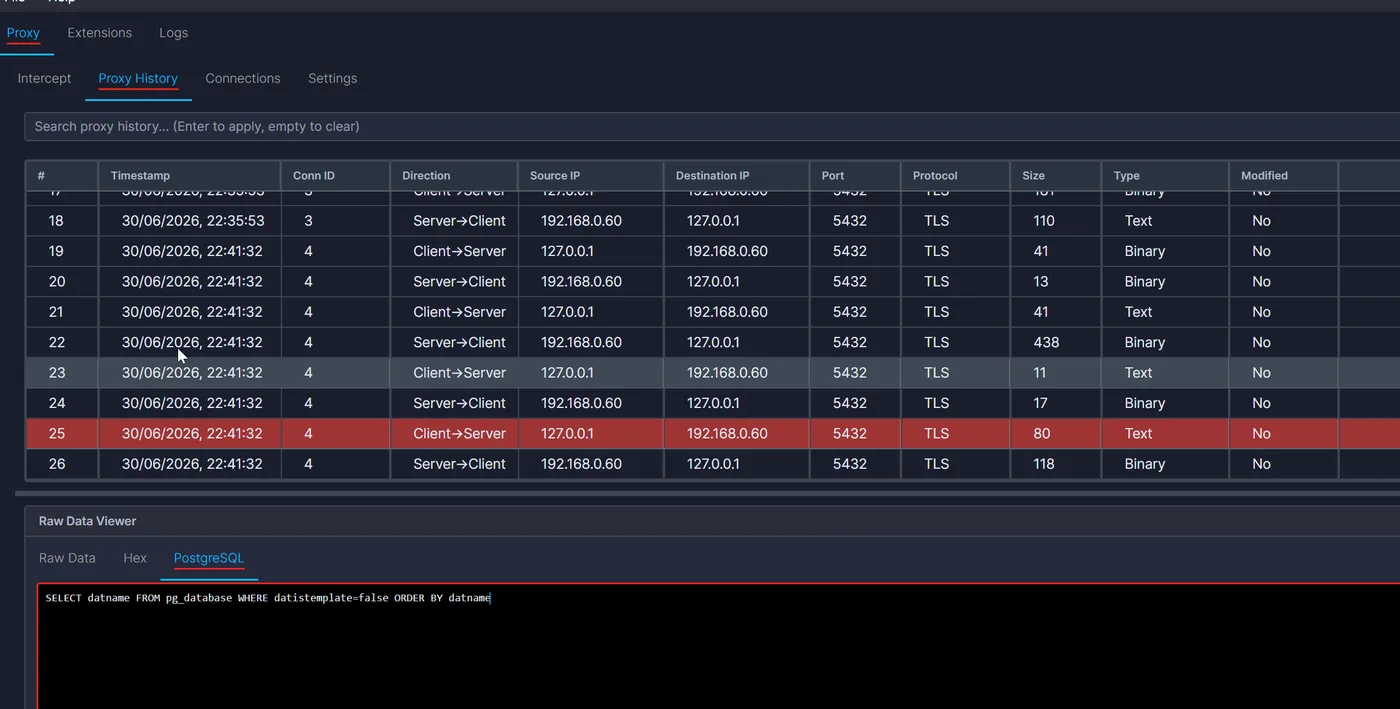
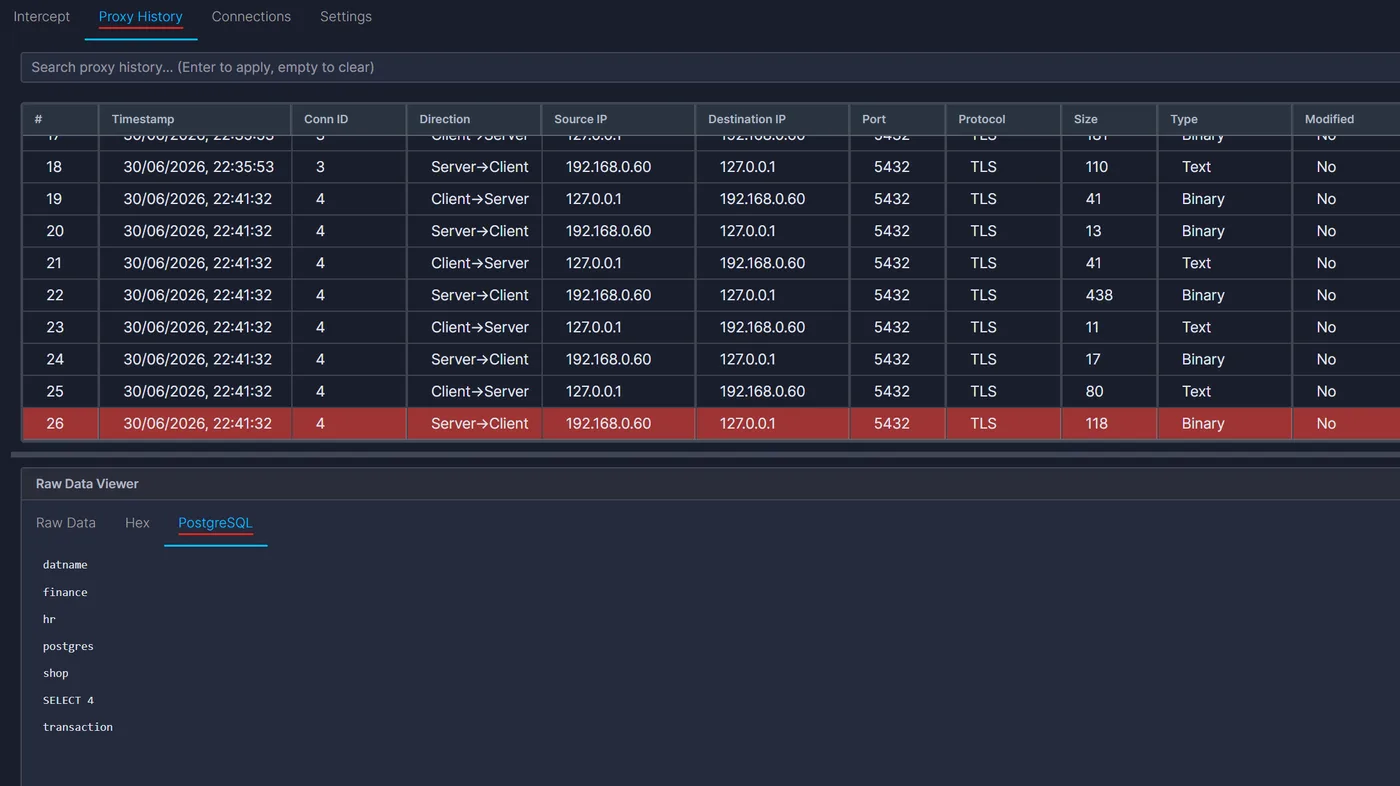
Switch to the Proxy History tab in InterceptSuite. You will see the PostgreSQL connection listed. Click to expand it and see the fully decrypted wire protocol: startup parameters, queries, and server responses in plaintext.
For example, to list all non-template databases on the server:
psql -h 192.168.0.60 -U appuser -d postgres -c "SELECT datname FROM pg_database WHERE datistemplate=false ORDER BY datname"
You will see the full query and response in plaintext in the Proxy History tab.
Parsing PostgreSQL Protocol with Extensions
The PostgreSQL wire protocol uses a binary message format. A ready-made PostgreSQL decoder extension is available in the InterceptSuite public extension repository. Download it and load it directly into InterceptSuite to get a human-readable view of every PostgreSQL message type.
The extension parses message types including Simple Query, Parse, Bind, Execute, DataRow, CommandComplete, Authentication, and ReadyForQuery, and displays them in a dedicated tab in the Proxy History view.
See the Extension API reference for full documentation on writing your own custom protocol dissectors.
Known Limitations
SCRAM-SHA-256 with Channel Binding
SCRAM-SHA-256 authentication works transparently in most configurations. However, when the client negotiates SCRAM-SHA-256-PLUS (channel binding), interception is not possible with the current version of InterceptSuite.
Here is why: during SCRAM authentication with channel binding, the client computes a fingerprint of its own TLS session (the session between the client and the proxy) and embeds it inside the authentication message bytes. The proxy forwards those bytes unchanged to the PostgreSQL server. The server then extracts the TLS fingerprint from the message and compares it against its own TLS session (the session between the proxy and the server). These are two different sessions with two different fingerprints, so the server sees a mismatch and rejects the connection.
The proxy is doing nothing wrong at the packet level. The problem is that the authentication data itself references a TLS session the server has never seen. This is a fundamental MITM limitation when channel binding is active. If you encounter this, configure the PostgreSQL server to allow SCRAM-SHA-256 (without channel binding) or md5 in pg_hba.conf.
Clients with Embedded CA Certificates (SSL Pinning)
When sslmode is set to verify-ca or verify-full, the client verifies the server certificate against a trusted CA. Installing the InterceptSuite CA certificate into the operating system trust store is enough for most clients (psql, standard libpq builds, most JDBC drivers).
However, some clients ship with their own embedded CA bundle and ignore the OS trust store entirely. This is the database equivalent of SSL pinning in mobile applications: the client only trusts its own hardcoded CAs, so the InterceptSuite certificate is rejected regardless of what is installed at the OS level. In these cases, interception requires patching the client binary, replacing its embedded CA bundle, or reconfiguring the client to use sslmode=require instead of verify-ca.
Further Reading
- Extension API - write custom protocol dissectors
- Proxy History - navigate and filter intercepted connections
- Intercepting LDAP with InterceptSuite - same approach for LDAP STARTTLS
- InterceptSuite vs Echo Mirage - how InterceptSuite compares to legacy tools
- Pricing and Free Trial - start intercepting PostgreSQL and other non-HTTP protocols with a 7-day free trial
Start your free trial to intercept PostgreSQL and other non-HTTP protocols. No credit card required.