
MCPAIClaude CodeReplayThick ClientPenetration Testing
MCP for Non-HTTP Traffic: Let Claude Code Analyse Thick-Client Protocols
How InterceptSuite's built-in MCP server lets an AI agent read Proxy History, use Replay and change settings for non-HTTP traffic, with the safety controls you should turn on.
I
InterceptSuite Team
October 6, 2026·5 min read
MCP servers for proxies already exist for HTTP tooling. InterceptSuite 2.0.0 brings the same idea to non-HTTP traffic: an AI agent such as Claude Code or Claude Desktop can read your Proxy History, change settings, use Replay and, if you allow it, work the Intercept queue for TCP, TLS, DTLS, QUIC and UDP.
Last updated 6 October 2026.
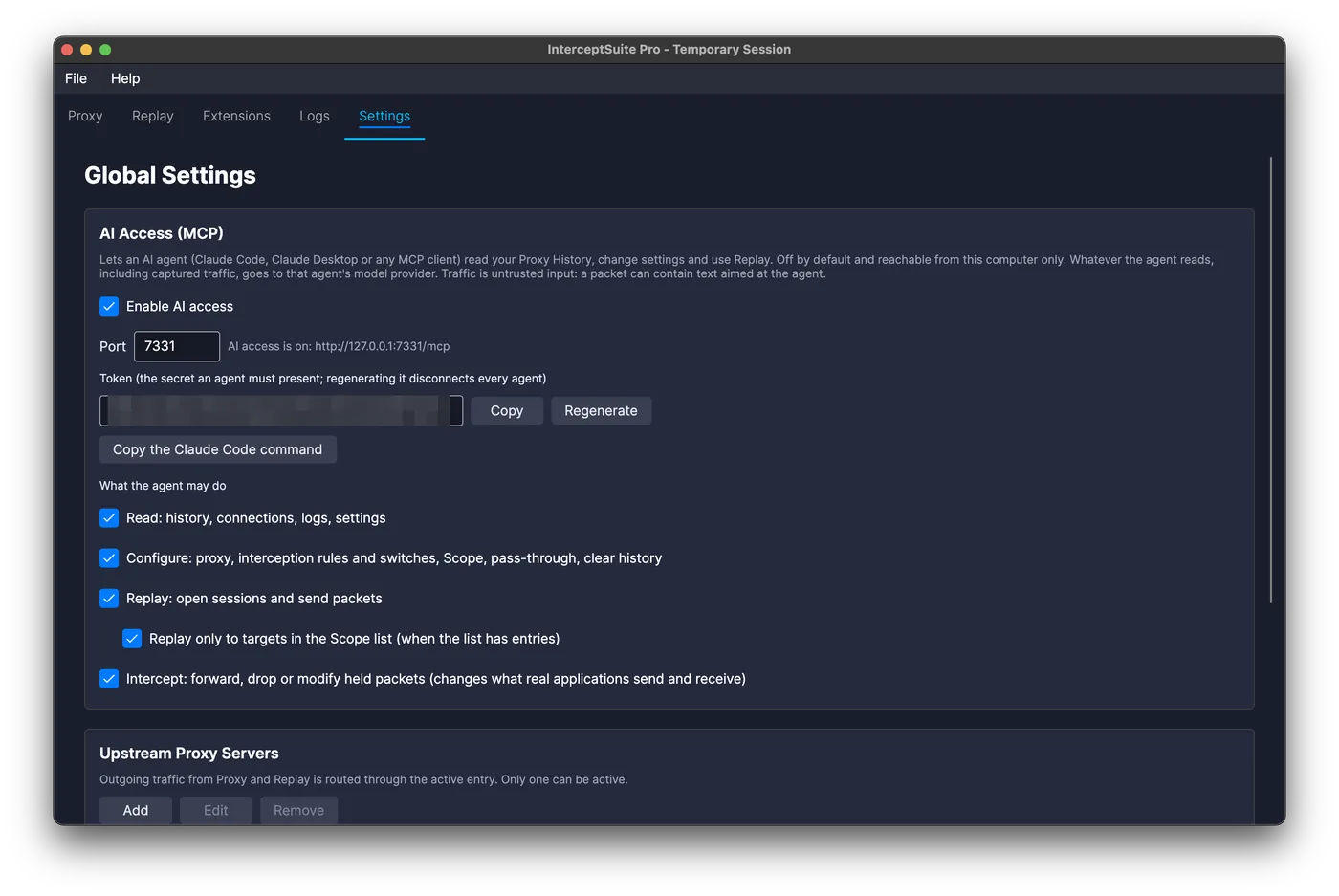
What an agent can do
- Read: search history with the same filter syntax as the search box, view and decode packets, connections, logs and settings.
- Configure: proxy settings, interception rules, Scope, TLS pass-through, clearing history.
- Replay: open sessions, send packets and read the replies.
- Intercept (off by default): forward, drop or modify held packets.
Each permission is a separate switch, and a switch that is off hides those tools from the agent. See the full list in the AI Access docs.
Connect Claude Code
Enable AI access in Settings > AI Access (MCP), copy the token, then run:
claude mcp add --transport http interceptsuite http://127.0.0.1:7331/mcp --header "Authorization: Bearer <token>"
Useful first prompts
- "Summarise the connections in Proxy History by host and protocol."
- "Find packets that look like authentication and describe the message format."
- "Open a Replay session to the host in packet 42, change the user ID field, and tell me how the reply differs."
The agent works from the same data you see, so you can check every claim in the History tab.
Safety, honestly
- Local only. The server accepts connections from your own machine, and every request needs the token.
- Logged. Everything an agent does appears in the Logs tab.
- Scope matters. "Replay only to Scope" is on by default, so keep your Scope list filled in.
- Traffic is untrusted. A captured packet can contain text aimed at the agent. Keep Intercept off unless you are watching.
- Your agent, your model, your data path. InterceptSuite only exposes a standard MCP server. It does not ship, host or choose an agent or model, and we receive none of the traffic. Use Claude Code, Claude Desktop or any MCP-capable agent, or a local model. What the agent reads goes to the provider you picked, so for traffic you cannot share, use a local model, switch Read off, or leave AI access off.
Where it helps, and where it does not
It is good at summarising large histories, spotting repeating structure and drafting Replay experiments. It does not replace your judgement on what is a vulnerability, and it will not decode a protocol it has never seen unless you give it the format.
Read the 2.0.0 release overview or start the 7-day trial.