
ReplayTCPUDPPostmanTestingDeveloper Tools
Postman for Raw TCP, UDP and TLS: How to Send a Packet to Your Server
Postman can't send raw TCP or UDP. Here is how to send a packet to your own server over TCP, TLS, UDP, DTLS or QUIC, edit it in hex, and read the response, with InterceptSuite Replay.
I
InterceptSuite Team
October 6, 2026·6 min read
Short answer: Postman has request types for HTTP and several other protocols, but not for a plain TCP or UDP socket. If you need to send raw bytes to a server and read what comes back, use a socket client. InterceptSuite Replay is a GUI for that: enter a host, port and protocol, type or paste the payload, click Send, and read the reply.
Last updated 6 October 2026.
The gap people hit
Postman's own issue tracker has an open request titled "Support raw TCP in API Client". It asks for "a TCP request type that takes in an IP and port and allows bidirectional streaming of bytes". A commenter on that thread says there is "no good tool for working with TCP servers" and falls back to shell, Python or Go scripts just to test something like Redis.
That matches what developers do today:
- A one-off
ncortelnetsession, which is awkward for binary data. - A throwaway script per protocol.
- A GUI terminal that only handles plain TCP and UDP.
What Replay does instead
Replay is a tab in InterceptSuite. Each session is its own tab with:
- Host and port, and a protocol choice: TCP, TLS, UDP, DTLS or QUIC.
- A payload editor with Raw (text) and Hex views. Binary payloads are sent exactly as shown.
- A Conversation panel that lists every packet sent and received, with direction, size and time. Select one to inspect it.
- Upgrade TLS for protocols that start in plain text and switch to TLS (STARTTLS).
You do not need captured traffic first. You can also right-click a packet in Proxy History and choose Send to Replay to copy its host, port, protocol and payload into a new session.
Example 1: send a command to Redis
Redis speaks a text protocol (RESP) over TCP.
- Open Replay, click + New Session.
- Host
127.0.0.1, port6379, protocol TCP. - Open the Hex tab and enter
2a 31 0d 0a 24 34 0d 0a 50 49 4e 47 0d 0a. That is*1,$4andPING, each ended with CRLF. - Click Send.
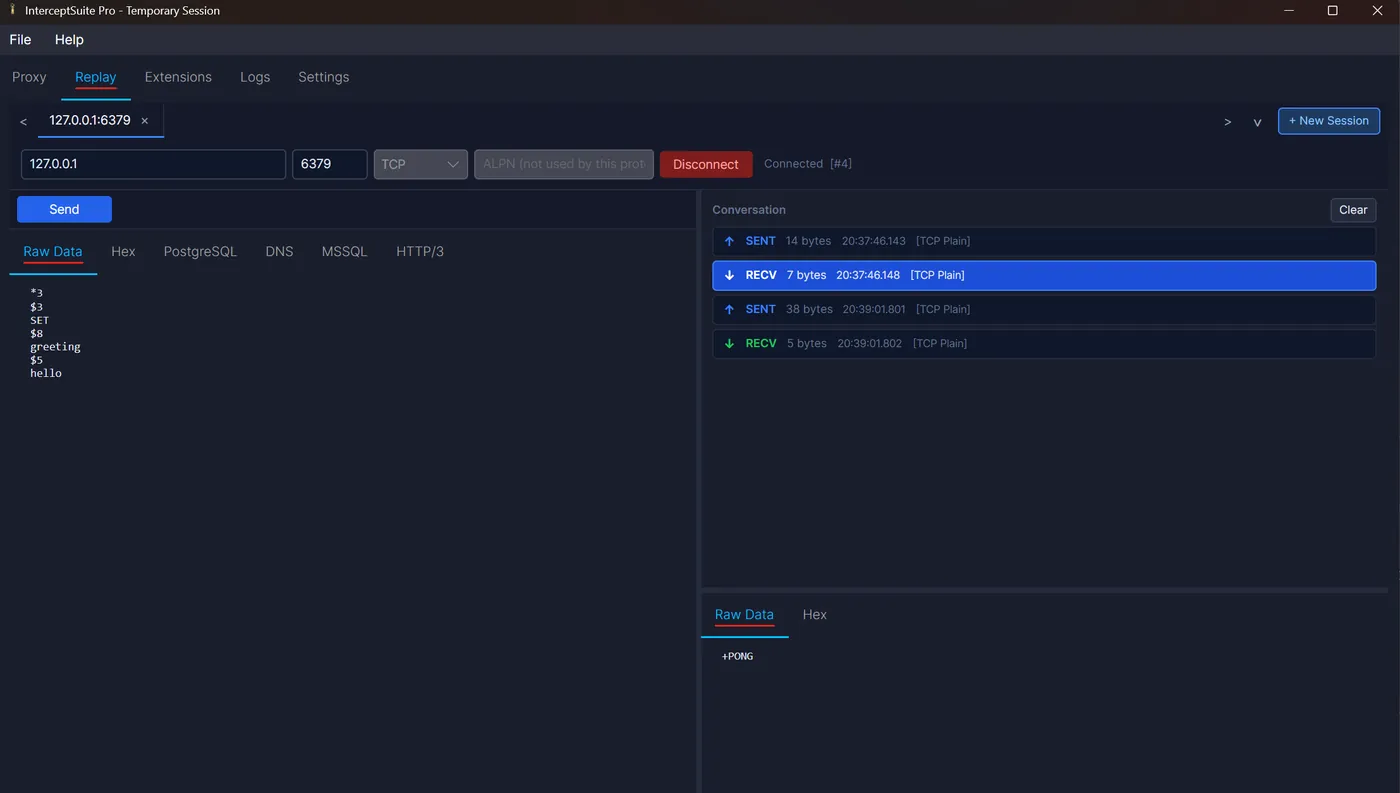
- The conversation panel shows the reply:
+PONG. The screenshot above shows this PING and aSET greeting hellosent in the same session.
Example 2: a binary frame to a custom server
For a length-prefixed binary protocol, switch to the Hex tab and type the frame bytes, for example a 4-byte length followed by a command byte and payload. Send it, then compare the reply bytes in the Hex view. Change one byte, send again, and read the difference. Use one tab per test so you can compare replies side by side.
Example 3: a TLS service with ALPN
Choose TLS, set the ALPN value your server expects (for example h2 or http/1.1), and send. The conversation panel shows TLS details for each packet. For QUIC, choose QUIC, use ALPN h3 for HTTP/3, and pick a stream type.
Postman, netcat or Replay?
| Postman | netcat / telnet | Replay | |
|---|---|---|---|
| Raw TCP socket | No request type | Yes | Yes |
| UDP | No | Yes (nc -u) |
Yes |
| TLS, DTLS, QUIC | HTTP over TLS only | Needs openssl or extra tools | Yes |
| Edit bytes in hex | No | Via xxd pipes |
Yes, built in |
| STARTTLS mid-session | No | No | Yes (Upgrade TLS) |
| Saved sessions | Collections | Shell history | Saved with the project |
| Price | Free tier | Free | Paid, 7-day trial |
Postman and netcat are still the right tools in some cases. Use Postman for HTTP APIs. Use netcat for a quick plaintext check on a machine you are already logged into. Use Replay when the payload is binary, the connection needs TLS, or you want to keep and compare sessions.
Limits
- Replay sends one payload at a time. It is not a load or stress-testing tool.
- QUIC v2 and DTLS 1.3 are not supported yet.
Next steps
- Send hex bytes over TCP: netcat versus a GUI
- Test STARTTLS manually for SMTP, IMAP and PostgreSQL
- Replay docs
Start the 7-day trial and try it on your own server.