
ReplayTCPHexnetcatTestingEmbedded
How to Send Hex Bytes Over TCP: netcat and xxd vs a GUI
Send exact bytes to a TCP server with netcat and xxd, PowerShell or Python, then see how a GUI handles binary replies, TLS and repeated tests.
I
InterceptSuite Team
October 6, 2026·6 min read
Short answer: on Linux and macOS, echo <hex> | xxd -r -p | nc host port sends exact bytes. On Windows, use PowerShell or Python. When you need TLS, readable binary replies, or the same test many times, a GUI such as InterceptSuite Replay is quicker.
Last updated 6 October 2026.
netcat and xxd (Linux, macOS)
xxd -r -p turns a plain hex string into raw bytes, and nc sends them.
echo '2a310d0a24340d0a50494e470d0a' | xxd -r -p | nc 127.0.0.1 6379
That sends the Redis PING command. To see the reply as hex too:
echo '2a310d0a24340d0a50494e470d0a' | xxd -r -p | nc -w 2 127.0.0.1 6379 | xxd
Common problems:
ncexits before the reply. Add a timeout such as-w 2, or keep stdin open with(echo ... | xxd -r -p; sleep 1) | nc .... Flags differ between netcat versions, so checknc -h.- A newline gets added.
echoappends\n. Useprintf '%s' '2a31...'orecho -n. - Spaces in the hex.
xxd -r -pignores whitespace, so2a 31 0d 0aworks too.
PowerShell (Windows)
$bytes = [byte[]](0x2a,0x31,0x0d,0x0a,0x24,0x34,0x0d,0x0a,0x50,0x49,0x4e,0x47,0x0d,0x0a)
$client = New-Object System.Net.Sockets.TcpClient('127.0.0.1', 6379)
$stream = $client.GetStream()
$stream.Write($bytes, 0, $bytes.Length)
Start-Sleep -Milliseconds 300
$buf = New-Object byte[] 4096
$n = $stream.Read($buf, 0, $buf.Length)
($buf[0..($n-1)] | ForEach-Object { '{0:x2}' -f $_ }) -join ' '
$client.Close()
Python (any system)
import socket

payload = bytes.fromhex("2a310d0a24340d0a50494e470d0a")
with socket.create_connection(("127.0.0.1", 6379), timeout=3) as s:
    s.sendall(payload)
    print(s.recv(4096).hex(" "))
Where command-line tools get awkward
- TLS.
ncsends plain bytes. For TLS you switch toopenssl s_clientand its quirks. - Binary replies. You have to pipe through
xxdto read them. - Repeating a test. Editing one byte means editing and re-running a long command.
- UDP and DTLS. Possible with
nc -u, but DTLS needs other tools. - Comparing runs. Shell history is not a record you can reopen.
The same test in Replay
- Open Replay and click + New Session.
- Enter host
127.0.0.1, port6379, protocol TCP. - Open the Hex tab and enter
2a 31 0d 0a 24 34 0d 0a 50 49 4e 47 0d 0a. - Click Send. The reply appears in the conversation panel, with Raw and Hex views.
- Change a byte and send again. Use another tab to keep the first result.
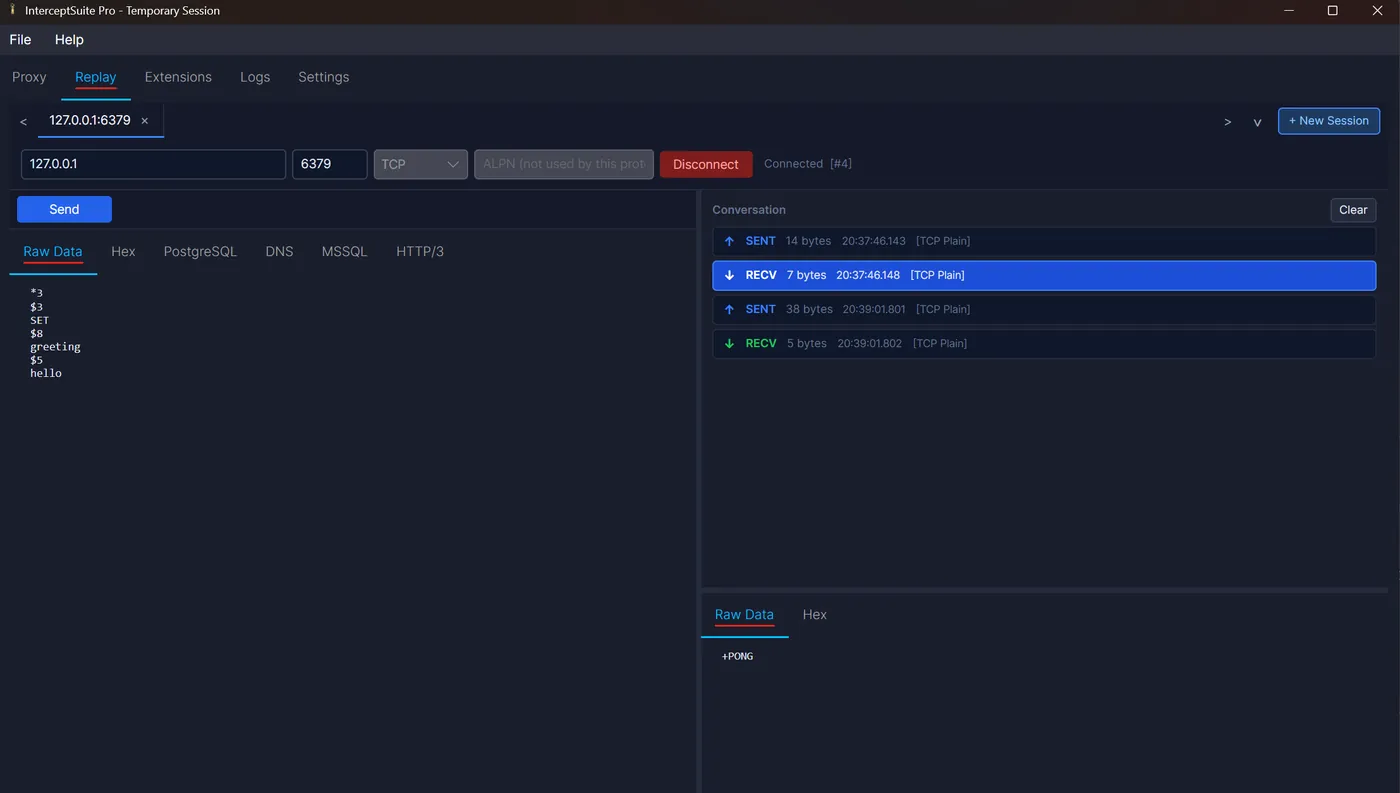
For TLS, choose TLS and set the ALPN value. For UDP, choose UDP. Replay sends the payload exactly as shown. See the Replay docs and the hex editor.
Which to use
| Situation | Use |
|---|---|
| Quick plaintext check on a Linux box | netcat and xxd |
| Windows, no tools installed | PowerShell |
| Automated test in a repo | Python script |
| TLS, binary replies, repeated edits, saved sessions | Replay |