
HTTP/3QUICQPACKSOCKS5UDPNetwork InterceptionReplay
How to Intercept HTTP/3 Traffic: QUIC and QPACK
A hands-on look at intercepting HTTP/3. How QUIC streams and QPACK work, what a proxy really sees, how to read and edit a request, and why the QPACK dynamic table makes some requests hard to read.
I
InterceptSuite Team
October 25, 2026·15 min read
Short answer: HTTP/3 does not go through an HTTP proxy, because it runs over QUIC, and QUIC runs over UDP. Most HTTP proxies, such as Burp Suite, are built on HTTP over TCP, so they never see it. To intercept HTTP/3 you need a proxy that can relay UDP and can act as a man in the middle for QUIC. After that, the work is about streams and header compression: the request is not text any more, it is bytes on a QUIC stream, compressed with QPACK.
In this post we intercept real HTTP/3 traffic from curl and from Microsoft Edge. Then we use a small lab server to look at every byte, so the QUIC and QPACK parts are easy to follow.
Table of contents
- What changes with HTTP/3
- Why your usual proxy setup does not work
- Real traffic 1: curl
- Real traffic 2: Browser traffic
- The lab: seeing every byte
- The hard part: the QPACK dynamic table
- Replay: send your own HTTP/3 request
- Limits to know
A note on the tool: raw traffic, not HTTP
This post uses InterceptSuite, so you should know what it is and what it is not. It is not built for HTTP. It is built for raw network traffic: TCP, TLS, UDP, DTLS and QUIC. Because it can intercept UDP and QUIC, it can handle HTTP/3 too. But it does not come with an HTTP parser, and that is also true for HTTP/3. The core shows raw bytes.
To read and edit those bytes as HTTP, InterceptSuite has an extension API, and there is an official, open source HTTP/3 extension that decodes the QUIC stream and QPACK headers into text. You can read the code, change it, or send a fix. The decoding in the screenshots below comes from that extension, not from the core.
What changes with HTTP/3
If you have only used HTTP/1.1 or HTTP/2, three things are different.
1. It runs on QUIC, not TCP. HTTP/3 (RFC 9114) is HTTP carried over QUIC (RFC 9000). QUIC packets travel inside UDP datagrams. TLS 1.3 is part of the QUIC handshake (RFC 9001), so there is no separate "TCP then TLS" step.
2. The client has to learn that the server speaks HTTP/3. The ALPN name for HTTP/3 is h3. A server can advertise it with an Alt-Svc response header, and a DNS HTTPS record can advertise it too (RFC 9460). So a browser often makes its first request over TCP, then moves to QUIC.
3. Everything is a stream. A QUIC connection carries many streams. The two lowest bits of a stream ID tell you what it is (RFC 9000, section 2.1):
| Stream ID ends in | Meaning |
|---|---|
0 (binary 00) |
Client starts it, both sides can send |
1 (binary 01) |
Server starts it, both sides can send |
2 (binary 10) |
Client starts it, only the client sends |
3 (binary 11) |
Server starts it, only the server sends |
In HTTP/3, every client-started two-way stream is one request and its response (stream 0, 4, 8 and so on). The one-way streams are for housekeeping: a control stream, and two QPACK streams. Their type is the first byte on the stream: 0x00 control, 0x02 QPACK encoder, 0x03 QPACK decoder (RFC 9114, section 6.2 and RFC 9204, section 4.2).
One more detail that matters for interception. The first packets of a QUIC connection (the Initial packets) are protected with keys that anyone can calculate from the connection ID, so they have no real secrecy (RFC 9001, section 5). That is why a passive observer can still see things like the server name in the handshake. Everything after the handshake is encrypted with keys from the TLS 1.3 exchange. You cannot read it without being one of the two ends. A proxy that wants to read HTTP/3 has to be one of the two ends.
Why your usual proxy setup does not work
HTTP proxies use CONNECT to open a tunnel. In HTTP/3, CONNECT still builds a tunnel to a TCP connection (RFC 9114, section 4.4). To tunnel UDP over HTTP there is a different method, CONNECT-UDP (RFC 9298), and most tools and apps do not use it.
SOCKS5 can relay UDP. The command is UDP ASSOCIATE (RFC 1928). But many clients never use it. For example, the Chromium network docs say that in Chrome, SOCKSv5 is only used to proxy TCP-based requests and cannot relay UDP (Chromium proxy docs). So pointing a browser at a SOCKS5 proxy does not send its QUIC traffic through that proxy, and you are not testing the QUIC path.
That leaves two practical ways to get QUIC traffic into a proxy:
- The app (or a library) speaks SOCKS5 UDP itself. The lab client later in this post does this, so you can see exactly what the proxy receives.
- You redirect the app's traffic from outside the app, so it does not need to know about the proxy. This is what we use for curl and Edge. ProxyBridge does this on its own. InterceptSuite also has a Redirect tab, which is built on ProxyBridge and works inside the app.
For how this compares with mitmproxy, see the QUIC interception post.
Setup: the Redirect tab
Open Proxy, then Redirect, click Add, type the program name (for example curl.exe), leave the action on Proxy, and save. Then click Start Redirect. The status line says Redirecting through the proxy at 127.0.0.1:4444, and the program's TCP and UDP traffic goes through InterceptSuite without changing any setting in the program.
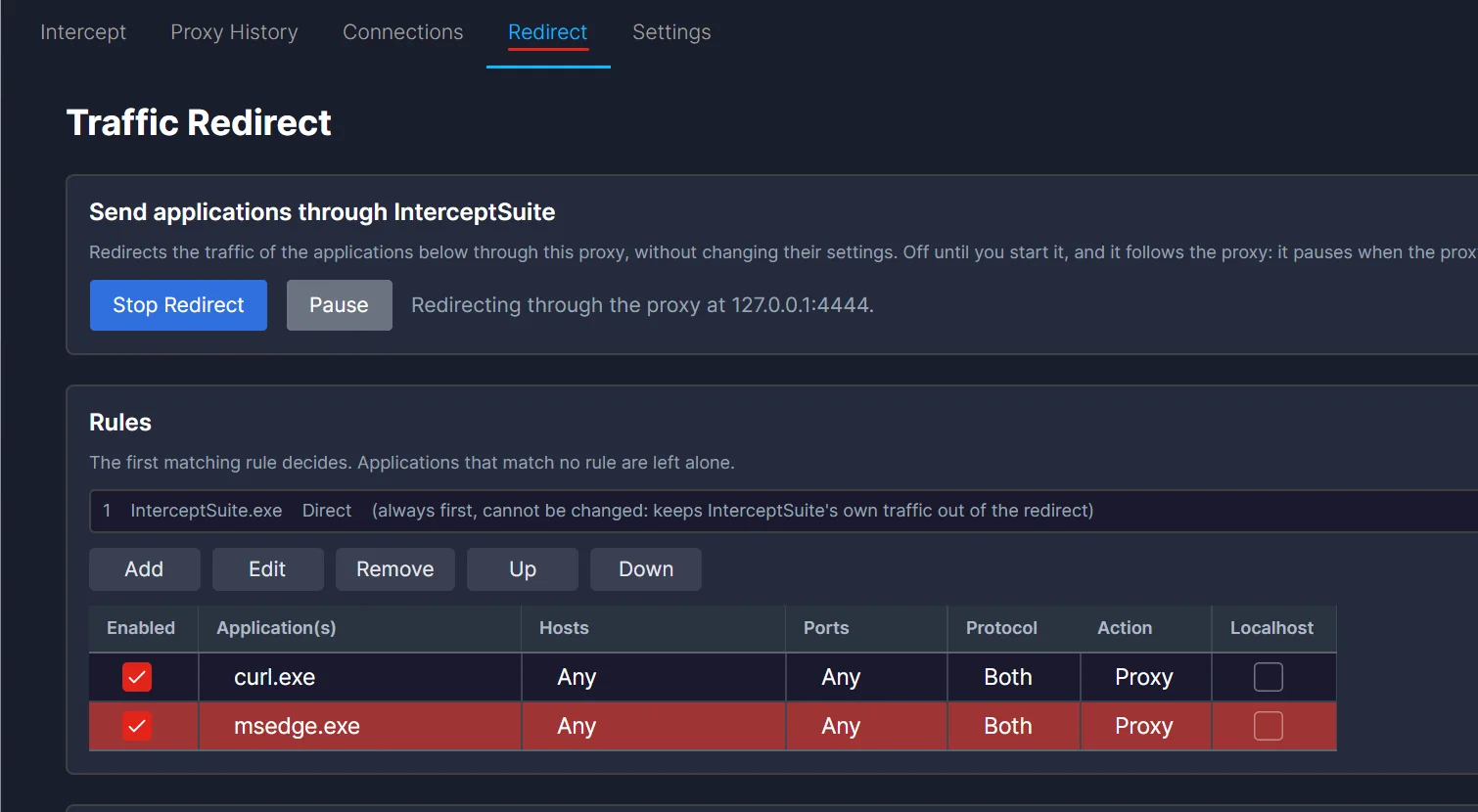
A rule can also limit the destination hosts and ports. The first matching rule decides, and programs that match no rule are left alone. Remember to trust the InterceptSuite CA on the machine, as in the quick start.
Real traffic 1: curl
curl is a good first test because it is simple and does exactly what you tell it. It needs a build with HTTP/3 support. This example runs on Windows. The curl that ships with Windows (8.21.0 here) does not support HTTP/3: curl -V does not list HTTP3 in its features. So we installed a second curl build that does:
winget install cURL.cURL
The new build (8.23.0) lists HTTP3, ngtcp2 and nghttp3 in curl -V. Check yours the same way before you test, and make sure the new curl is the one that runs (open a new terminal after the install).
curl --http3-only -sS -D - https://cloudflare-quic.com/cdn-cgi/trace
--http3-only makes curl use HTTP/3 and nothing else, so it cannot quietly fall back to TCP. With the Redirect rule on, curl worked without any proxy option and its output showed HTTP/3 200. No -k was needed, because curl used the Windows trust store, where the InterceptSuite CA is installed.
In Proxy History the connection appeared as QUIC with host cloudflare-quic.com and ALPN h3:
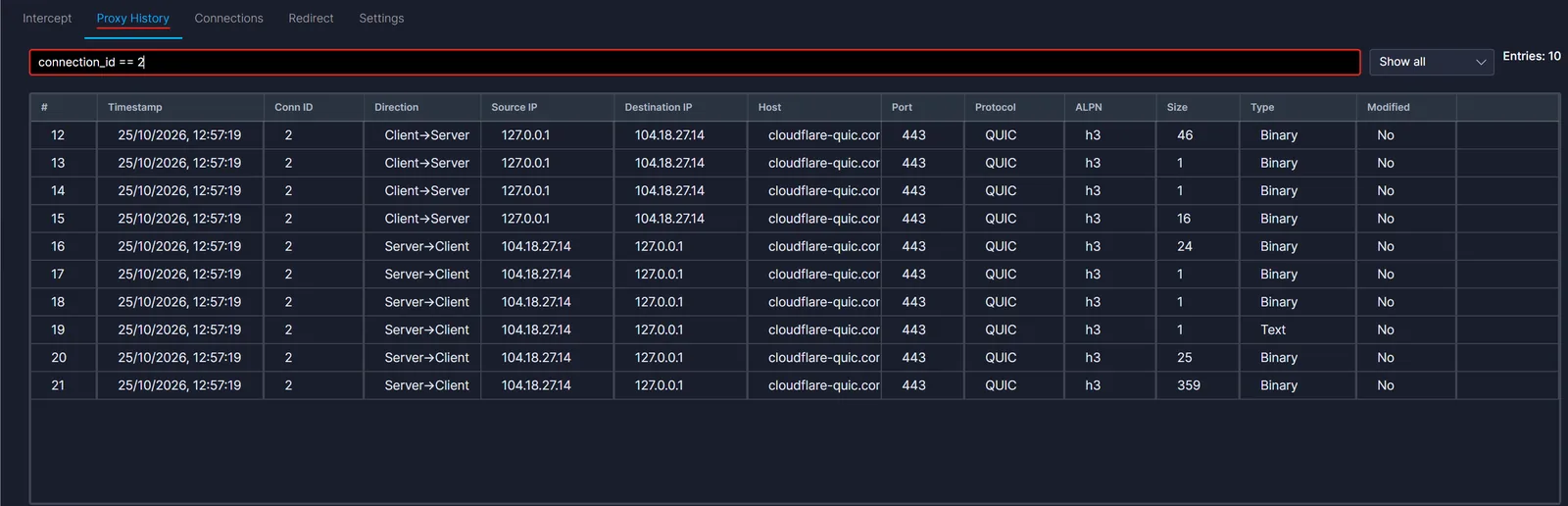
The first client packet (46 bytes) is the request. With the HTTP/3 tab it reads like this:
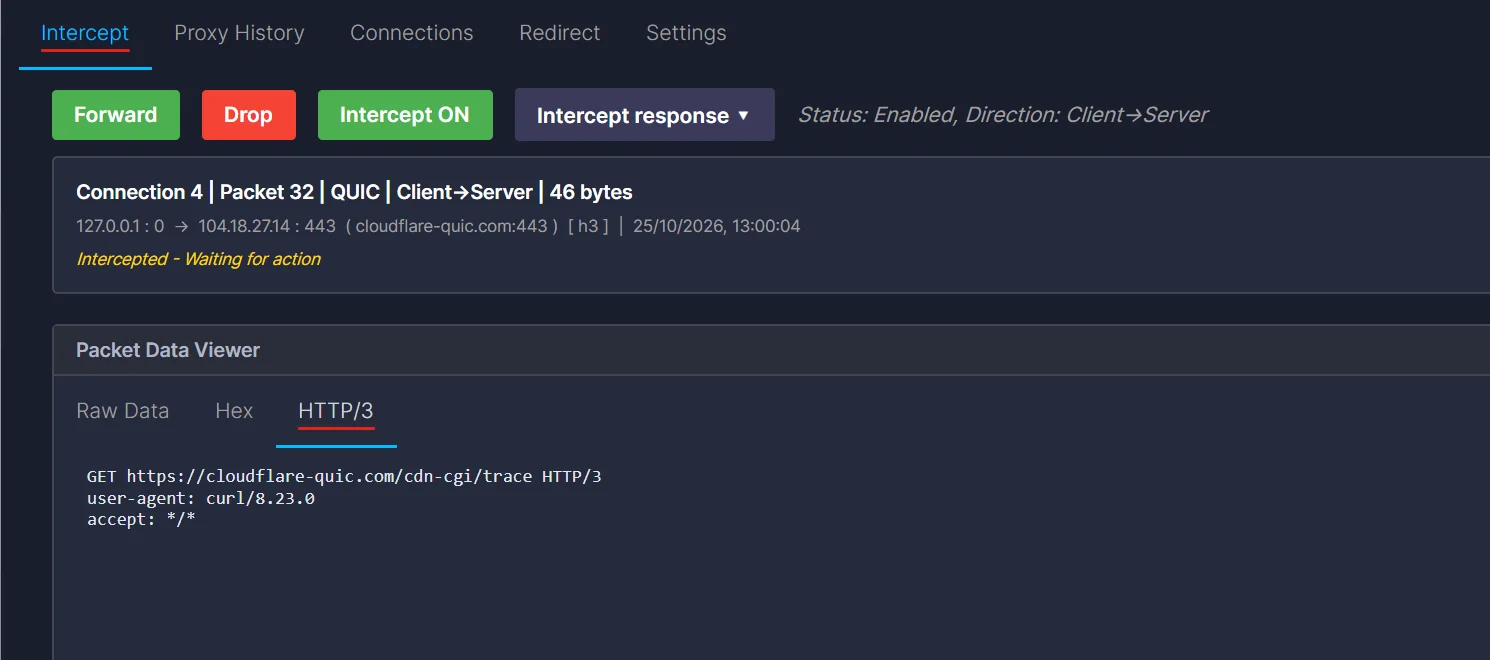
Now turn Intercept ON, run curl again, and change the request while it is held. Replace user-agent: curl/8.23.0 with user-agent: edited-by-proxy and press Forward:
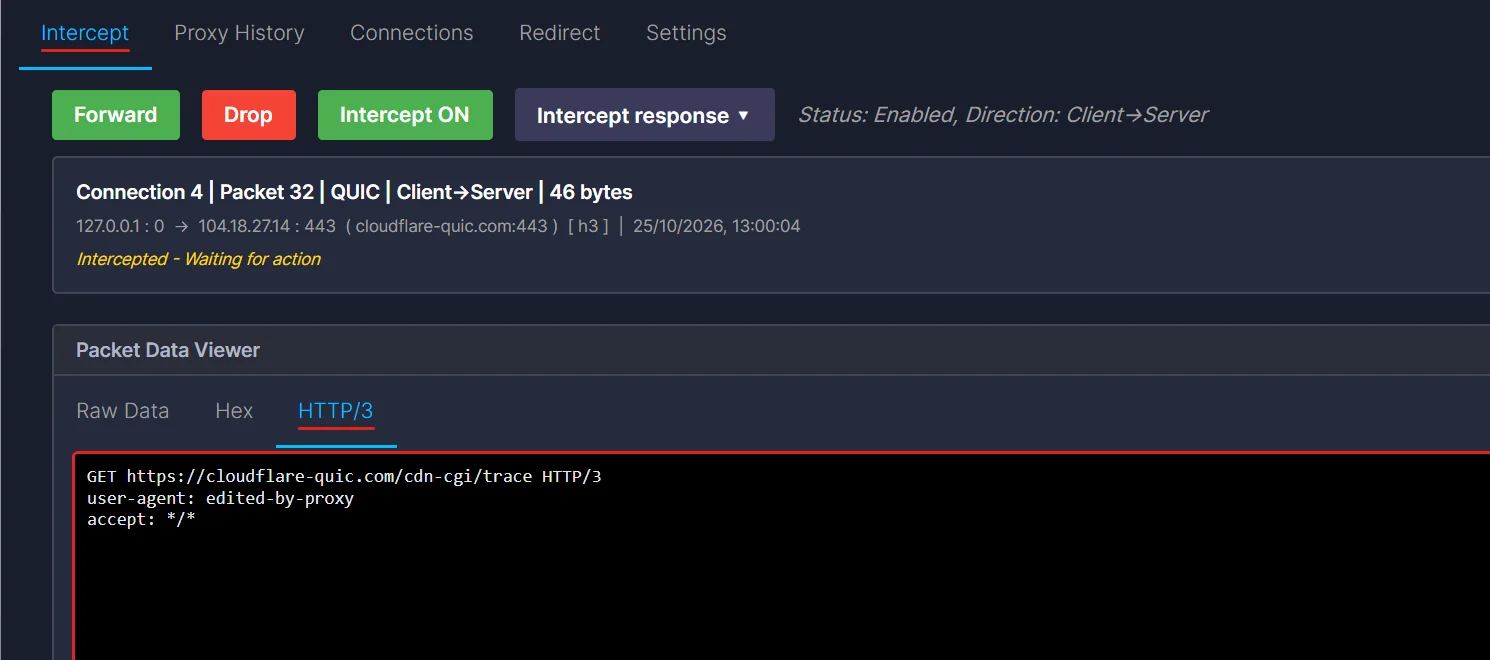
The test site prints back what it saw. The first run says uag=curl/8.23.0. The run with the edit says:
uag=edited-by-proxy
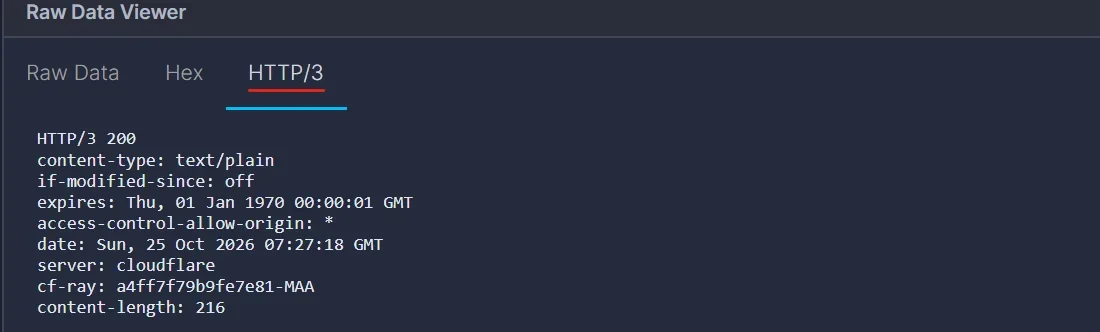
So the server got the edited header, and curl never knew. The response is readable too:
Look at curl's SETTINGS frame, from the client:
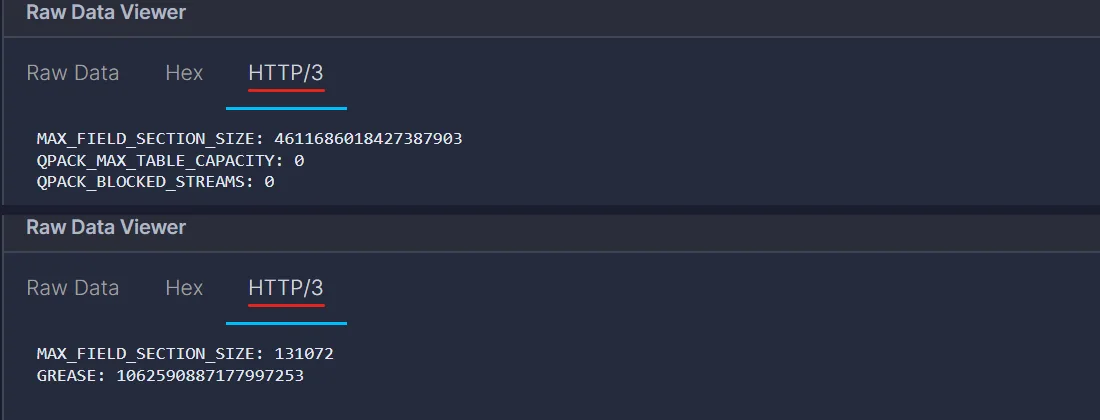
QPACK_MAX_TABLE_CAPACITY: 0 means curl does not use the QPACK dynamic table at all. That is why every curl request is easy to read and edit. We will see the opposite case later.
Real traffic 2: Browser traffic
Browsers are harder, for two reasons.
- ECH (Encrypted Client Hello). The real site name is hidden inside the handshake. The proxy only sees the CDN's public name, so it makes a certificate for the wrong name and the browser rejects it.
- Chromium does not run QUIC with a locally added CA. Even when Windows trusts the CA, Chromium refuses QUIC on a certificate that chains to a user-installed CA.
The fix is to start the browser with three flags:
msedge.exe --disable-features=EncryptedClientHello,UseDnsHttpsSvcb
           --ignore-certificate-errors-spki-list=<hash>
           --origin-to-force-quic-on=*
--disable-features=...turns off ECH and stops the browser from reading HTTPS DNS records, where the ECH keys come from.--origin-to-force-quic-on=*makes Edge try QUIC straight away, instead of waiting for anAlt-Svcheader.*means every host. Usehost:443for one site.--ignore-certificate-errors-spki-list=<hash>trusts QUIC connections signed by the InterceptSuite CA. Use this flag and not--ignore-certificate-errors.
<hash> is the base64 SHA-256 of the CA's public key. You calculate it from your own CA file:
openssl x509 -in intercept-ca.pem -pubkey -noout | openssl pkey -pubin -outform der | openssl dgst -sha256 -binary | openssl enc -base64
Edge shows a bar saying the flag is unsupported. That is expected, and it is why you should use a test profile and not your daily one. Close all Edge windows before you start it, or the flags are ignored.
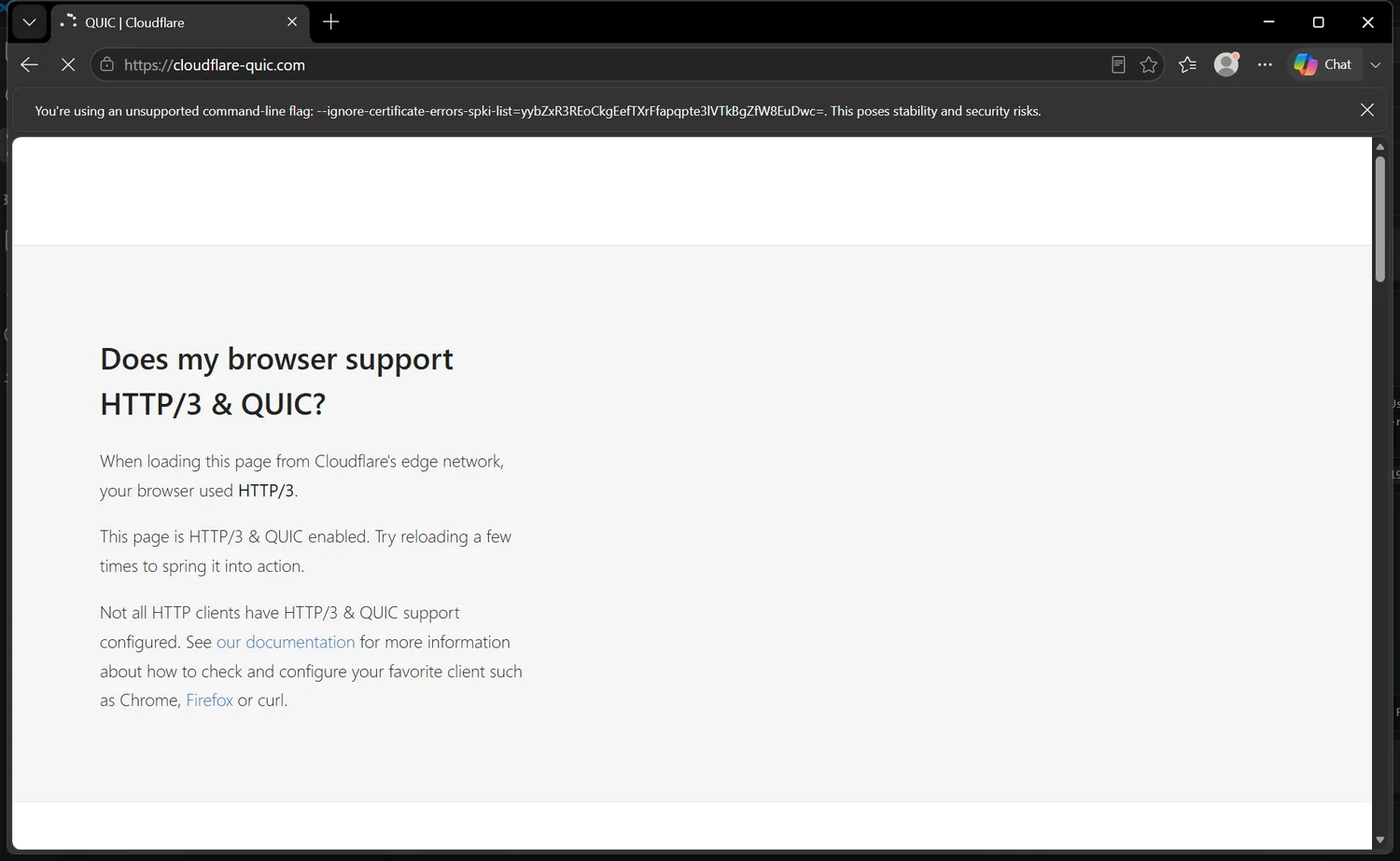
With the Redirect rule for msedge.exe on, open https://cloudflare-quic.com/. The page says "your browser used HTTP/3":
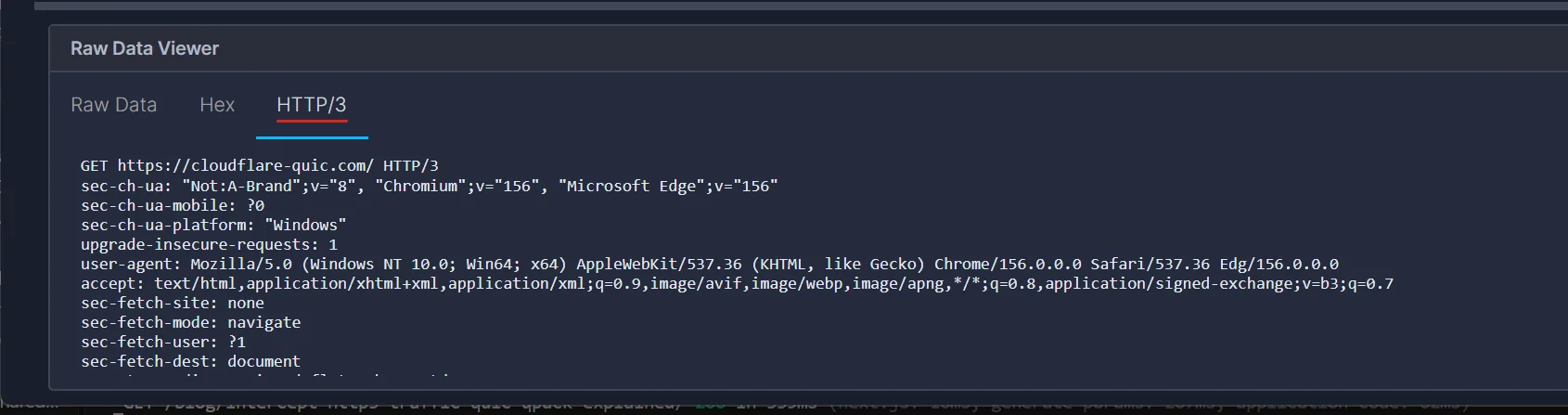
In InterceptSuite the same visit was a QUIC connection with ALPN h3. The request from Edge, decoded by the extension:
And the response, with the alt-svc: h3=":443" header the site uses to advertise HTTP/3:
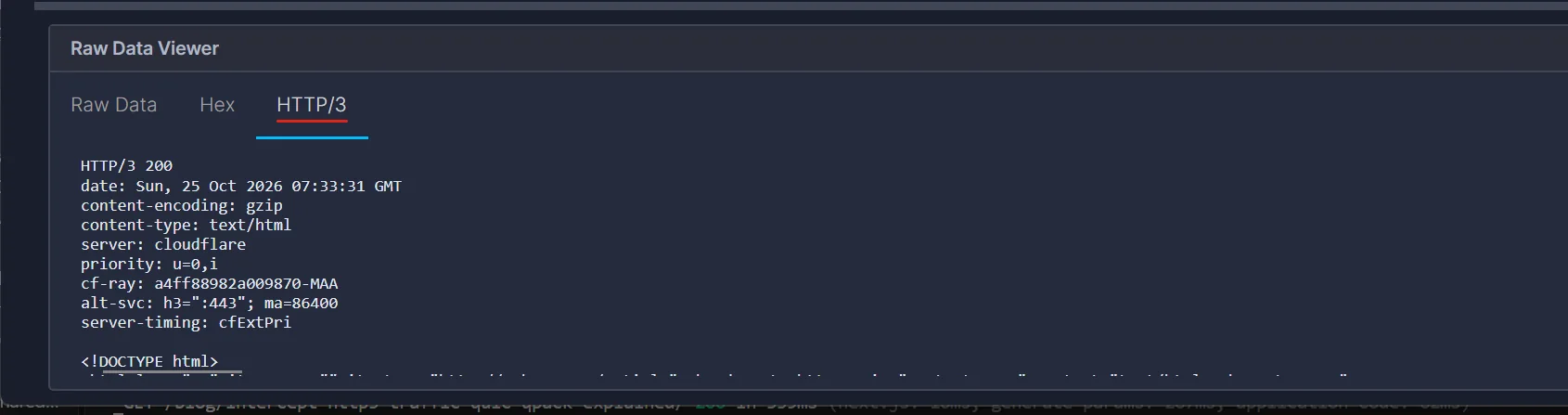
The response body here is content-encoding: gzip. The extension decompresses it for display, so the body shows as HTML.
Edge's SETTINGS are very different from curl's:
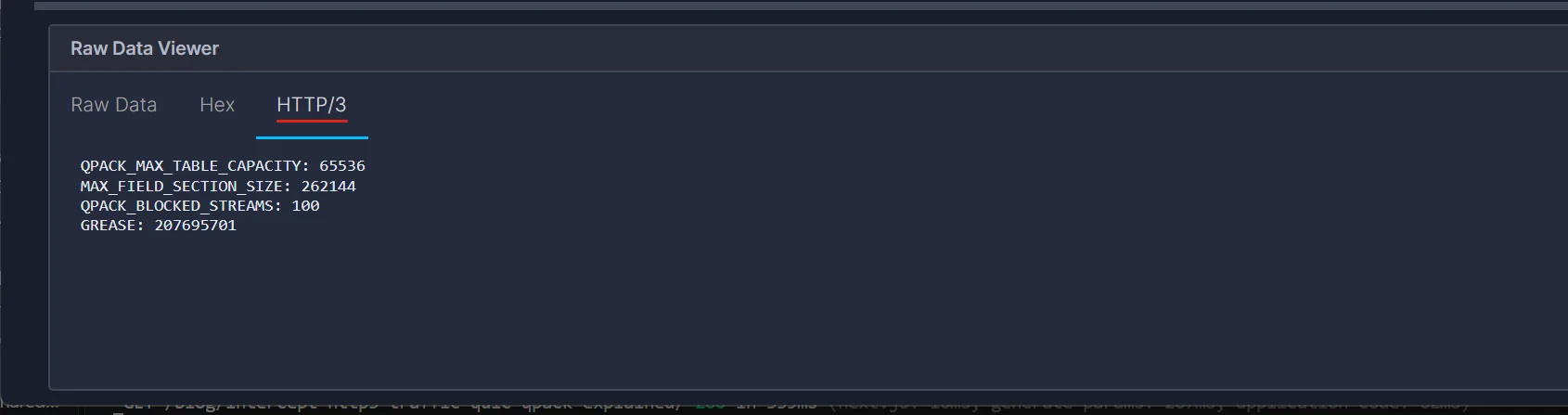
Edge offers a 64 KB dynamic table and up to 100 blocked streams, so after the first request, Edge can send headers as table references. The QPACK section below explains what that means for reading and editing.
How SOCKS5 carries UDP
UDP ASSOCIATE works in two parts.
- The client opens a normal TCP connection to the proxy, does the SOCKS5 greeting, and sends the command
03(UDP ASSOCIATE). The proxy answers with an address and a port. This is the UDP relay. - The client sends UDP datagrams to that relay address. Each datagram starts with a small header, then the real payload.
The header, from RFC 1928 section 7:
RSV (2 bytes) | FRAG (1) | ATYP (1) | DST.ADDR (variable) | DST.PORT (2) | DATA
The association lives as long as the TCP connection that asked for it. If that TCP connection closes, the UDP association ends (RFC 1928, section 6). This is easy to forget when you write your own client.
InterceptSuite listens on 127.0.0.1:4444 for SOCKS5 over TCP and 127.0.0.1:4445 for the UDP relay (see the quick start). The reply to UDP ASSOCIATE points to 127.0.0.1:4445.
The lab: seeing every byte
Real servers make it hard to see what is going on, so here is a small lab. Both sides use Python and aioquic.
- Server: a small HTTP/3 server on
127.0.0.1:4433with a self-signed certificate. It answers with JSON that repeats what it received (method, path, one custom header, and the body). It also prints what it got, so you can see what actually arrived. - Client: an HTTP/3 client that sends its datagrams through the SOCKS5 UDP relay. aioquic does not know about SOCKS5, so the client wraps its datagrams itself. This is the whole trick:
class Shim(asyncio.DatagramProtocol):
    """Wraps each QUIC datagram in the SOCKS5 UDP header."""
    def sendto(self, data, addr=None):
        hdr = b'\x00\x00\x00\x01' + socket.inet_aton(SERVER[0]) + struct.pack('!H', SERVER[1])
        self.t.sendto(hdr + data, self.relay)

    def datagram_received(self, d, addr):
        if d[0:3] != b'\x00\x00\x00' or d[3] != 1:
            return
        self.proto.datagram_received(d[10:], SERVER)   # strip the 10 byte header
The lab client skips certificate checks. That is fine for a lab. A real app must trust the proxy's CA certificate, or it will close the connection when it sees the forged certificate. See Install the CA certificate for that step.
The lab client sent one request:
POST /login   (body: user=alice&pw=hunter2)
user-agent: h3-lab-client/1.0
accept: application/json
authorization: Bearer eyJhbGciOiJIUzI1NiJ9.demo.token
cookie: session=abc123def456; theme=dark
x-demo: first
What the proxy sees: ten rows for one request
Here is Proxy History after the client connected, sent requests, and closed.
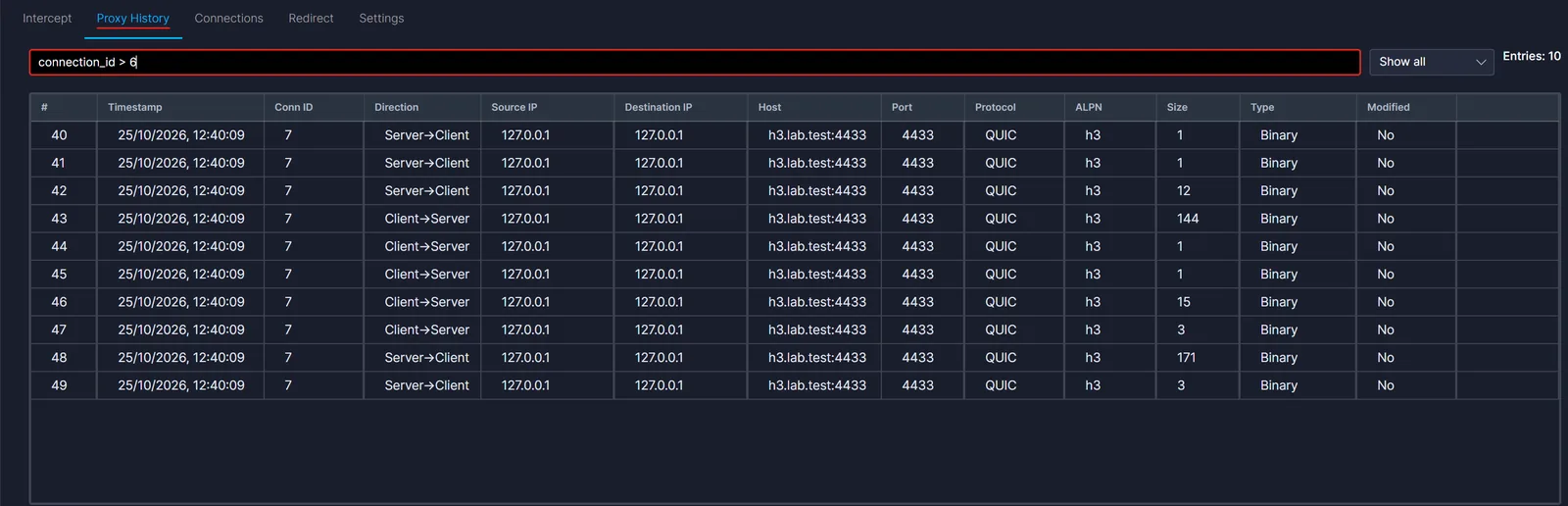
The host column shows h3.lab.test. That is the server name from the TLS handshake. The ALPN column shows h3. The Protocol column says QUIC.
The thing most people do not expect is the number of rows. One request gave 10 entries, not 2. Each row is a chunk of data from one QUIC stream, in the order the proxy saw it. The small ones are all HTTP/3 housekeeping:
| Direction | Size | Bytes | What it is |
|---|---|---|---|
| Both ways | 1 | 03 |
Stream type byte: QPACK decoder stream |
| Both ways | 1 | 02 |
Stream type byte: QPACK encoder stream |
| Both ways | 12 (server), 15 (client) | 00 04 09 01 50 00 07 10 08 01 21 01 |
Control stream: type 00, then a SETTINGS frame |
| Both ways | 3 | 3F E1 1F |
QPACK: Set Dynamic Table Capacity to 4096 |
| Client to server | 144 | starts with 01 |
The request: a HEADERS frame, then a DATA frame |
| Server to client | 171 | starts with 01 |
The response: HEADERS, then DATA |
The client's control stream is three bytes longer than the server's: 0D 01 08 at the end, which is a MAX_PUSH_ID frame.
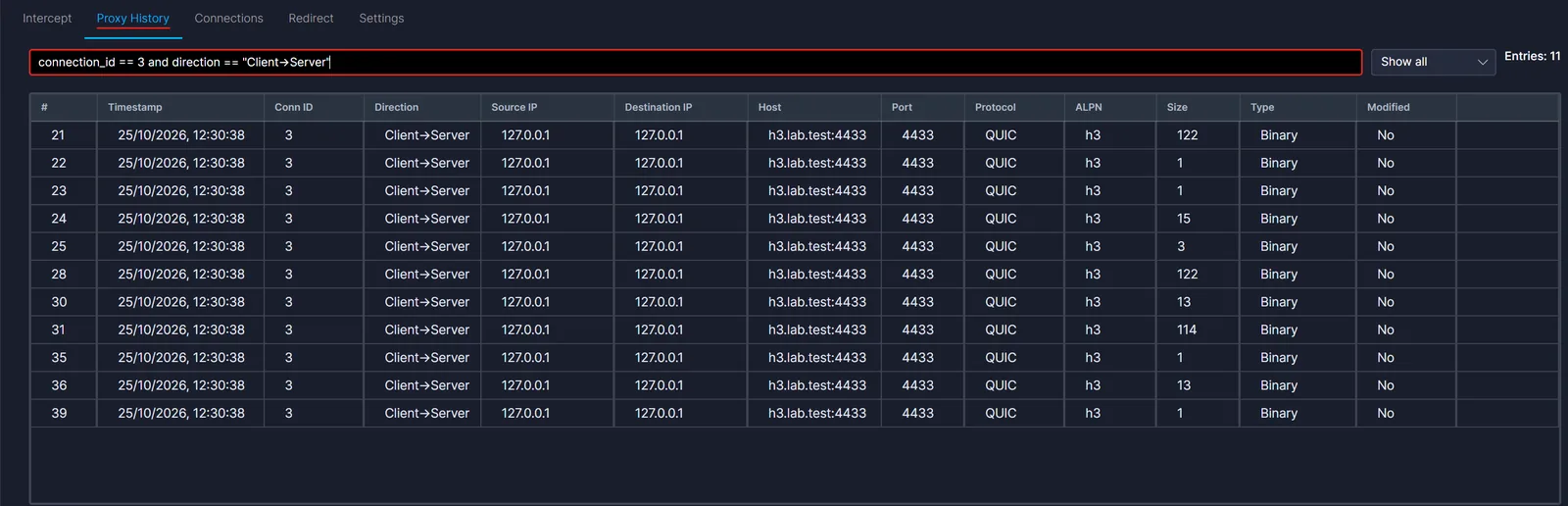
Filtering helps a lot here. The filter box understands things like connection_id == 3 and size > 100. The available fields are src_ip, dst_ip, port, direction, protocol, size, modified, connection_id, type, data, host and alpn.
The SETTINGS frame
With the HTTP/3 extension loaded, the control stream entry is shown as text:

Read it against the bytes:
00            stream type: control
04 09         frame type SETTINGS, length 9
01 50 00      setting 0x01 (QPACK_MAX_TABLE_CAPACITY) = 4096
07 10         setting 0x07 (QPACK_BLOCKED_STREAMS)    = 16
08 01         setting 0x08 (ENABLE_CONNECT_PROTOCOL)  = 1
21 01         a reserved ("GREASE") setting
The 50 00 part is a QUIC variable-length integer. The first two bits (01) say it uses two bytes, and the value is 0x1000, which is 4096. This one matters later, because QPACK's dynamic table is off by default. Both QPACK settings default to zero (RFC 9204, section 5). This server turned it on and allowed 16 blocked streams.
Reading the request
Now the request itself. This is the raw view of the held request packet:
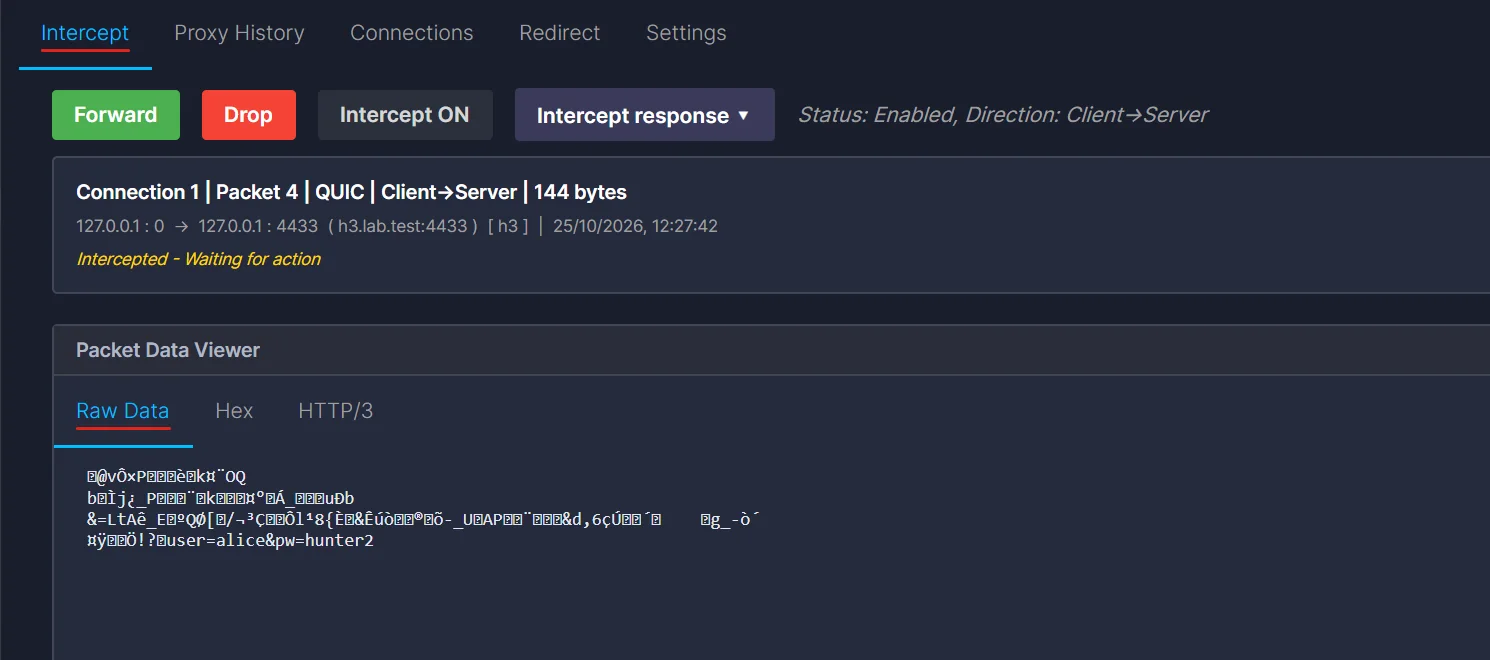
You can see the body (user=alice&pw=hunter2), because the body is not compressed. The headers are unreadable. This is QPACK. It is HPACK's cousin for HTTP/3 (RFC 9204), and it does three things:
- A static table. 99 predefined header fields, for example
:method GETorcontent-type application/json. A whole header becomes one small number. - Huffman coding for strings that are not in the table. QPACK uses the Huffman table from HPACK without changes.
- A dynamic table. A table that grows during the connection. Both ends fill it in using the two QPACK streams (
02and03). We will come back to this.
The HTTP/3 extension from the Extension repository decodes all of this into text. Open the HTTP/3 tab on the same packet:
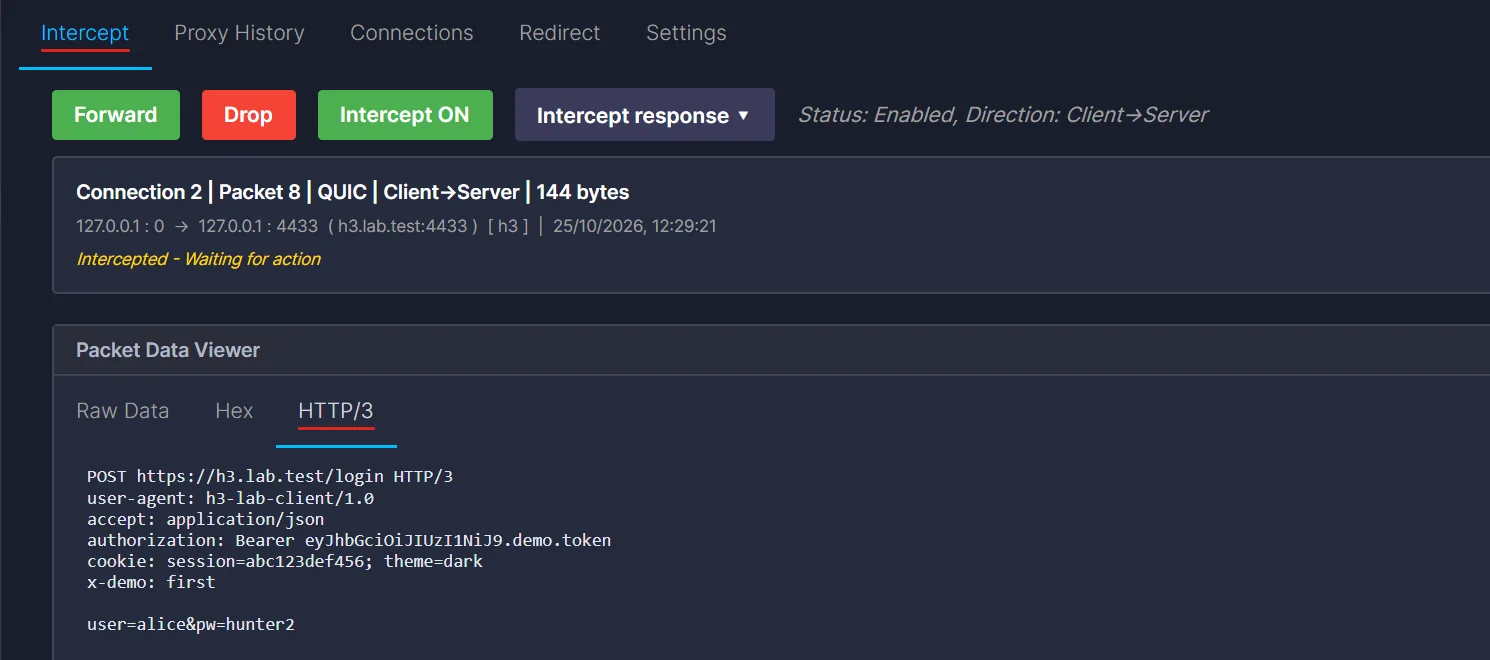
The core of InterceptSuite shows HTTP/3 as raw bytes. The decoded view comes from this extension. The extension is a normal Python file, and you can read it. Its _decode function parses the QUIC variable-length integers, the HTTP/3 frames, then the QPACK block with the static table and Huffman decoder.
Editing the request in flight
Turn Intercept ON. By default it holds client-to-server packets. There is also an Intercept response option for the other direction.
When the client sends its request, the request packet is held and the queue says 1 packet(s) waiting. Change two things in the HTTP/3 tab: the x-demo header and the body.
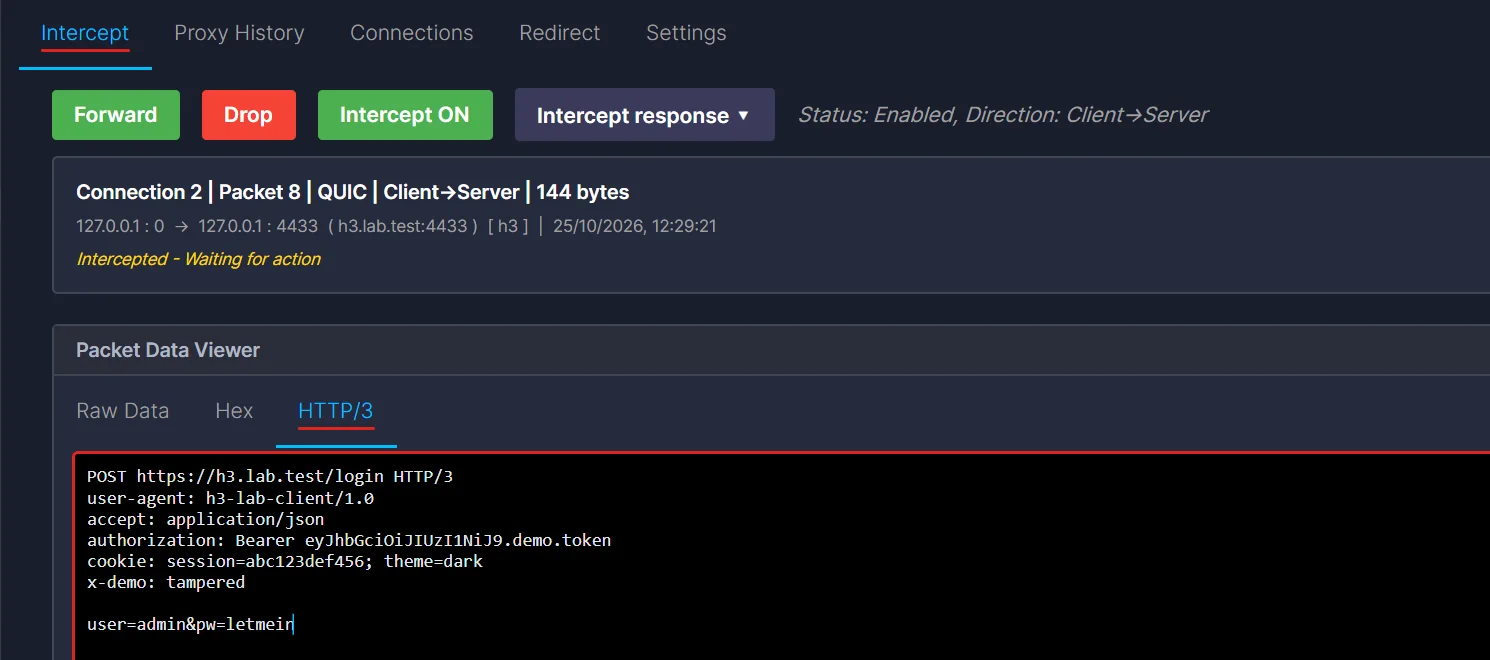
Then press Forward. The server printed this:
SERVER got POST /login x-demo= tampered body= b'user=admin&pw=letmein'
So the server received the edited request. The client got a normal 200 answer from the server, and its own copy of the request was never changed.
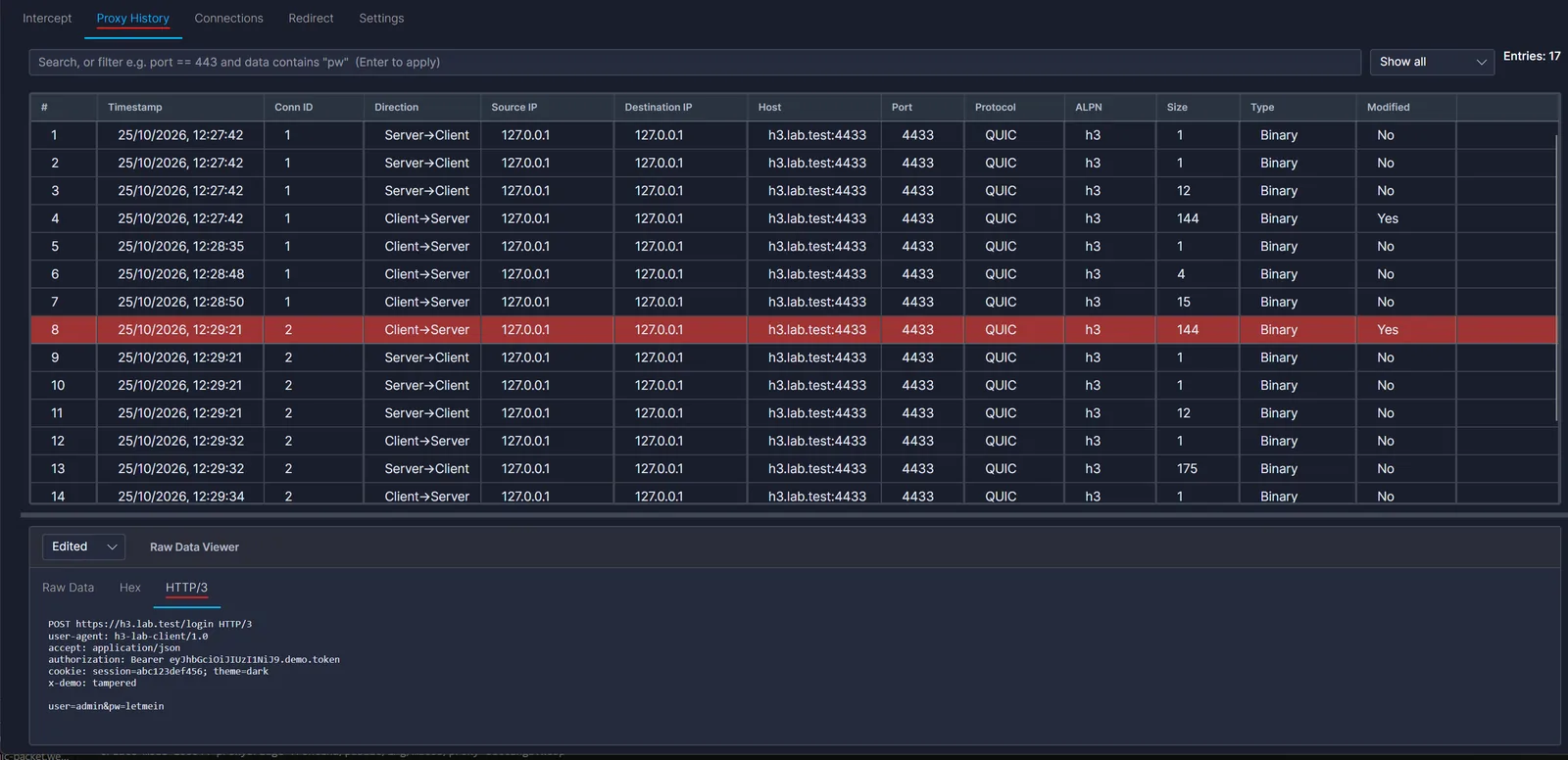
In Proxy History, the row shows Modified: Yes, and the viewer can show the Original and Edited versions:
Two practical points from doing this:
- Every chunk is held, not only the request. The small stream packets (
02,03, the control stream) are held too, one by one. After you forward the request, the queue still has items. Press Forward until it is empty. - Your client has its own timeouts. If you take too long to edit, the client may give up and close the connection. Edit fast, or raise the timeout in the client you test.
What happens to the bytes when you edit
The extension does not patch the old bytes. It builds a new HEADERS frame. From the source, the rules are:
- The headers are written again with the static table only and plain (not Huffman) strings. Required Insert Count is set to zero. This means the new header block does not depend on the dynamic table.
- If the body changes, it builds a new DATA frame. If the request has a
content-lengthheader, it updates that number too. If there is acontent-encoding, it compresses the new body again. - The frame lengths are calculated again, so the HTTP/3 framing stays valid.
- If it cannot do this safely (for example the body is binary, or it is cut off, or it continues in a later entry), it changes nothing. It never sends half-built bytes.
The hard part: the QPACK dynamic table
This is the part that needs care. So far everything decoded nicely. Now send more requests on the same connection (same headers, different path) and look again.
The sizes tell the story. Requests 1 and 2 were 122 bytes each. Request 3 was 13 bytes. And at some point, a 114-byte entry showed up on the client's QPACK encoder stream.
Here are the 13 bytes of request 3, the way they were on the wire:
01 0B 08 86 D1 D7 10 11 12 13 14 15 16
01 0Bis a HEADERS frame, 11 bytes long.08 86is the QPACK block prefix: the Required Insert Count and the Delta Base. A Required Insert Count that is not zero means this header block needs entries from the dynamic table.D1andD7are two entries from the static table (:method GETand:scheme https).10 11 12 13 14 15 16are seven "indexed field line with post-base index" instructions. Each one points to an entry in the dynamic table. The request says "use entries 0 to 6" and nothing else.
Where are the entries? In the 114-byte entry on the encoder stream. Its first bytes are C0 88 9D 95 E8 1C 6B A4 A8 4F, which is "insert :authority, with a Huffman-coded value" (the value decodes to h3.lab.test). The client sent the long header values once, and every later request only sends numbers. This is a good design. It is also what makes interception harder.
Look at what the HTTP/3 tab shows for request 3:
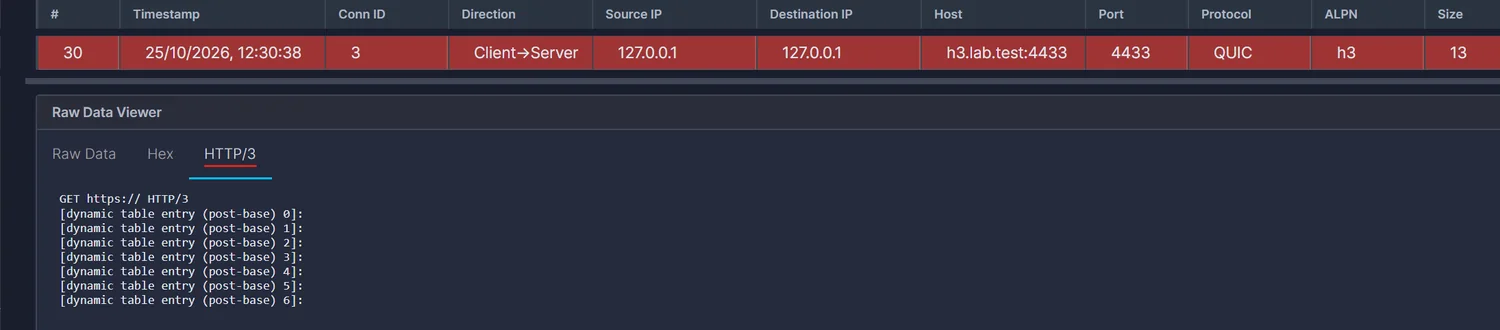
GET https:// HTTP/3
[dynamic table entry (post-base) 0]:
[dynamic table entry (post-base) 1]:
...
[dynamic table entry (post-base) 6]:
The path, the host, the cookie and the token are gone. That is not a bug in the display, it is the nature of QPACK. The values for these entries were sent earlier, on a different stream. A single history row does not contain them. The extension decodes one entry at a time and does not keep the QPACK table of the connection, so it can only show placeholders.
The server's response did the same thing. After a few responses, its header block started using the dynamic table, and the HTTP/3 tab shows the body but only placeholders for two of the headers:
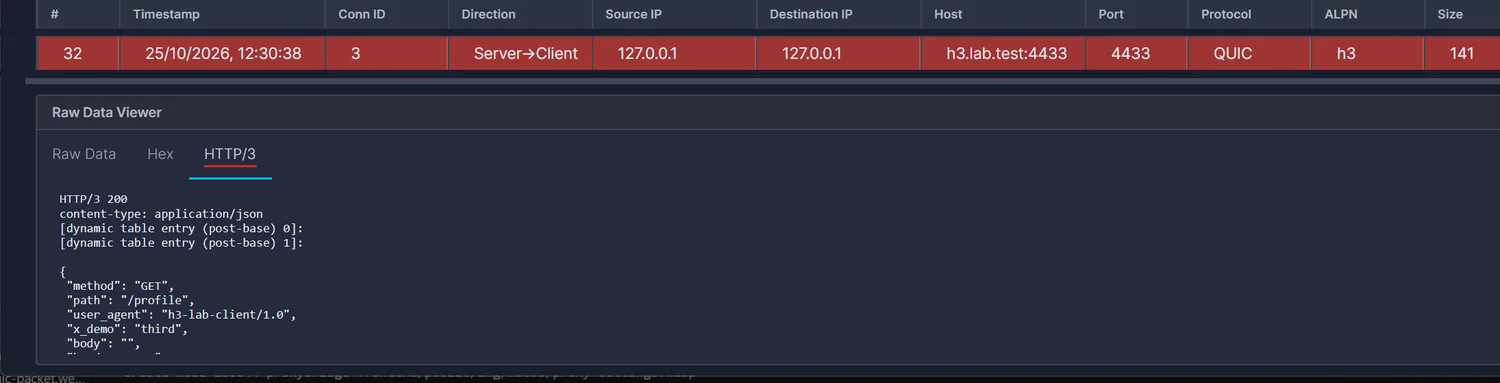
There is one more thing to see here. In the capture, the 13-byte request (row 30) arrived before the 114-byte encoder stream entry (row 31). That is allowed by design. QPACK lets a request stream wait ("block") until the inserts it needs have arrived. The server announced it could keep up to 16 blocked streams (the QPACK_BLOCKED_STREAMS setting we saw above). Later a single byte 88 comes back from the server on its decoder stream. That is a Section Acknowledgment for stream 8, which was the third request: the decoder tells the encoder it processed a header block that needed the table (RFC 9204, section 4.4.1).
So two things follow for a tester:
- You cannot edit these requests with the extension. From the source: if a header block uses the dynamic table, the extension does not rebuild it, and your edit is not applied.
- The data is not lost. The values are in the encoder stream entry in Hex view, and in the raw bytes. You can still forward, drop, and replay them. You just cannot read them as text.
How do you work around it?
- Use the start of a connection. In the lab, the first two requests did not use the table at all, because the client had not inserted anything yet. Whether that holds for your client depends on its QPACK encoder, so check it.
- Replay on a fresh connection, with an edit. A new QUIC connection starts with an empty table. When you edit a request in the HTTP/3 tab, the extension writes it with the static table only, so it does not depend on any earlier state. The next section does exactly this, and the server answers.
- Do not replay a dynamic-table request unchanged. If you send the 13-byte request from Replay on a new connection, the server never answers and never logs the request. That fits how QPACK works. The request points to table entries that this new connection never received, so it cannot be read.

- Look at the encoder stream. It has the real values, in Huffman form. If you must read them, decode the Huffman strings by hand or write a small extension that tracks the table.
Replay: send your own HTTP/3 request
Right-click a row in Proxy History and choose Send to Replay.
The session opens with the details filled in: host, port, protocol QUIC, ALPN h3, New bidirectional stream, and End stream (FIN) ticked. HTTP/3 request streams are client-started two-way streams, so that is the correct choice. The FIN flag matters because the lab server only answers after it sees the end of the request.
In the lab the host name h3.lab.test is only a name in the TLS handshake and does not resolve, so change the host to 127.0.0.1. In the HTTP/3 tab, change the path to /admin and x-demo to replayed, then press Send.
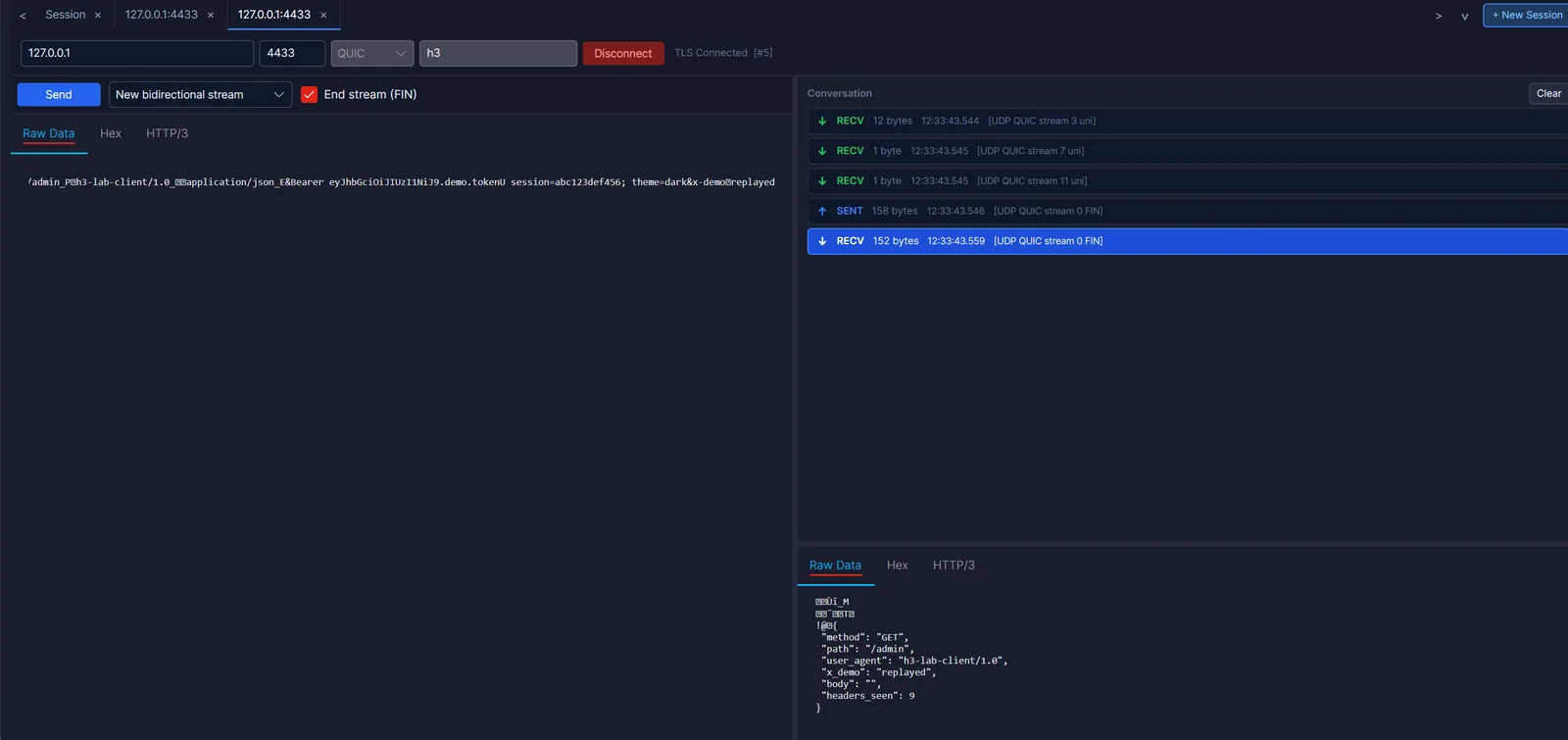
The conversation shows what happened on the wire:
- Three packets came from the server on its one-way streams: stream 3 (12 bytes, its control stream), stream 7 (1 byte, QPACK encoder) and stream 11 (1 byte, QPACK decoder). The stream numbers match the rule from the table at the start: they end in
11in binary, so they are server-started one-way streams. SENT 158 byteson stream 0 with FIN is the request.RECV 152 byteson stream 0 with FIN is the response.
The server printed GET /admin x-demo= replayed, and the response JSON shows "path": "/admin" and "x_demo": "replayed".
What a broken request looks like
If the edited text leaves a broken header block, Replay sends only a few bytes (25 here) and the server closes the connection:

0x106 is H3_FRAME_ERROR. RFC 9114 says that if a stream ends and the last frame on it is cut short, the receiver must treat it as a connection error of this type (RFC 9114, section 7.1). In plain words: the frame header promised more bytes than the stream delivered. If you hand-craft HTTP/3 bytes in the Raw or Hex tab, this is the error you will meet first. It means your frame length does not match your data.
Limits to know
- QUIC version 1 only. QUIC version 2 is not supported yet.
- ECH. If a connection uses Encrypted Client Hello, it cannot be intercepted.
- The client must trust the CA. QUIC always uses TLS. If the app pins its certificate, or does not trust your CA, it will refuse the proxy's certificate.
- The UDP path must reach the proxy. If the app does not speak SOCKS5 UDP, redirect it from outside, for example with ProxyBridge UDP rules.
- The extension reads one entry at a time. It decodes request and response streams and the control stream. It does not track the QPACK table, so dynamic-table headers show as placeholders and cannot be edited.
- Large bodies. A body that continues in later entries cannot be edited as text.
You can find the current list in the protocol compatibility matrix.
A short checklist
- Route the UDP traffic into the proxy (SOCKS5 UDP, or redirect it).
- Trust the proxy CA on the machine that runs the client.
- Look at the history first. Expect many small rows per request.
- Use the HTTP/3 tab to read and edit requests that use only the static table.
- If you see
[dynamic table entry ...], look at the encoder stream entry in Hex, or test on a fresh connection. - Use Replay to resend and change a request without the client.
Related reading: Replay documentation, Proxy History documentation, the HTTP/3 extension source, and Intercepting QUIC and HTTP/3 when mitmproxy isn't enough.
You can try all of this on your own server with the 7-day trial. Only test servers you own or are allowed to test.